Back to all blogs
Discover how to detect deepfakes during live video meetings, spot key warning signs, verify identities, and prevent AI-powered interview fraud.

Video meetings have become an essential part of modern business communication. Companies rely on them for job interviews, executive meetings, client discussions, financial decisions, and other situations where knowing who is actually present matters.
But seeing and hearing someone on a video call does not necessarily mean that the person is genuine. AI can now manipulate faces, clone voices, and generate synthetic avatars in real time, making it possible to impersonate another person during a live interaction.
The scale of the problem is growing. In a 2024 Regula survey, 49% of businesses reported encountering video deepfake fraud, up from 29% in 2022.
Detecting a deepfake requires more than simply looking at someone's face. Organizations need to consider multiple signals, including facial movement, voice authenticity, lip synchronization, video quality, identity continuity, and behavior.
This guide explains what live video meeting deepfakes are, why they are difficult to detect, the warning signs to look for, and how to verify suspicious participants.
What Is a Deepfake in a Live Video Meeting?
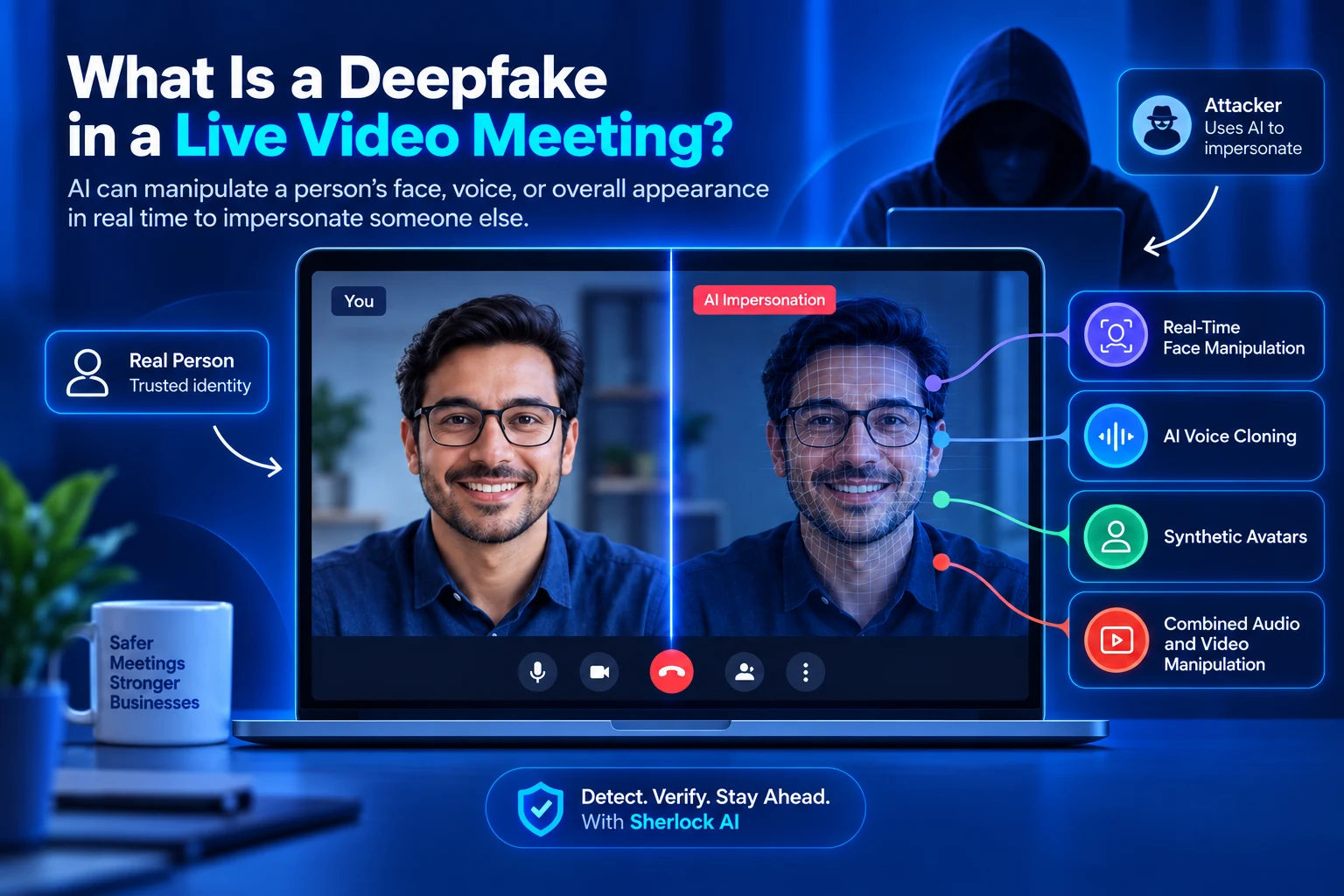
A deepfake in a live video meeting occurs when artificial intelligence is used to manipulate a person's face, voice, or overall appearance in real time. Unlike traditional deepfake videos that are created and edited before being shared, live deepfakes can change what other participants see and hear during the conversation. Attackers can use this technology to impersonate executives, employees, clients, job candidates, or other trusted individuals to gain information, influence decisions, or bypass normal verification procedures.
Live deepfakes can take several forms:
Real-Time Face Manipulation: AI alters a participant's facial appearance, expressions, or movements to make them appear as another person.
AI Voice Cloning: AI generates speech that mimics a person's tone, pronunciation, rhythm, and other vocal characteristics.
Synthetic Avatars: AI generates an artificial representation of a person that can appear to participate in a live conversation.
Combined Audio and Video Manipulation: Face manipulation, voice cloning, and other synthetic media techniques are combined to create a more convincing real-time impersonation.
Because live deepfakes can manipulate multiple parts of an interaction, effective deepfake detection should analyze several signals rather than relying on a single visual or audio check. Solutions such as Sherlock AI can help organizations analyze video, audio, identity, and behavioral signals to identify potential fraud during remote interactions.
Why Are Deepfake Difficult to Detect During Live Video Meetings?
Live deepfakes are difficult to detect because people naturally evaluate a video meeting as a complete interaction rather than analyzing every visual and audio detail. When someone looks familiar, sounds familiar, responds appropriately, and appears to understand the conversation, participants may accept their identity without questioning whether the underlying video or audio has been manipulated.
The challenge becomes even greater when the meeting involves someone participants already know or trust.
1. Human Attention Is Limited
During a video meeting, participants are usually focused on the conversation, not on analyzing facial movements, audio characteristics, lighting, or individual video frames.
A recruiter may be concentrating on a candidate's answers, while an employee may be focused on instructions from an executive. Subtle inconsistencies can therefore go unnoticed, particularly when the manipulation is designed to look natural.
2. Familiar Faces Create False Confidence
People are naturally more likely to trust someone they recognize. If a participant appears to be a familiar executive, colleague, client, or candidate, others may be less likely to question their identity.
This creates a significant verification risk: recognizing a face is not the same as verifying an identity. A familiar appearance should be supported by additional identity and authenticity signals before it is trusted.
3. Modern Deepfakes Can Look Highly Realistic
Deepfake technology has become increasingly capable of reproducing facial expressions, head movements, voices, and other characteristics of a real person.
As synthetic media becomes more convincing, simple visual inspection becomes less reliable. Organizations therefore need to evaluate multiple signals across the interaction rather than relying on whether a participant simply “looks real.”
4. Technical Problems Can Look Like Deepfake Artifacts
Not every unusual video or audio behavior indicates manipulation. Network latency, video compression, microphone problems, webcam limitations, changing lighting, and connection issues can cause blurry faces, audio delays, flickering, or synchronization problems.
For this reason, a single unusual artifact should not be treated as proof of a deepfake. Detection becomes more reliable when multiple independent inconsistencies appear together or persist throughout the interaction.
How Do Deepfakes Work in Live Video Meetings?
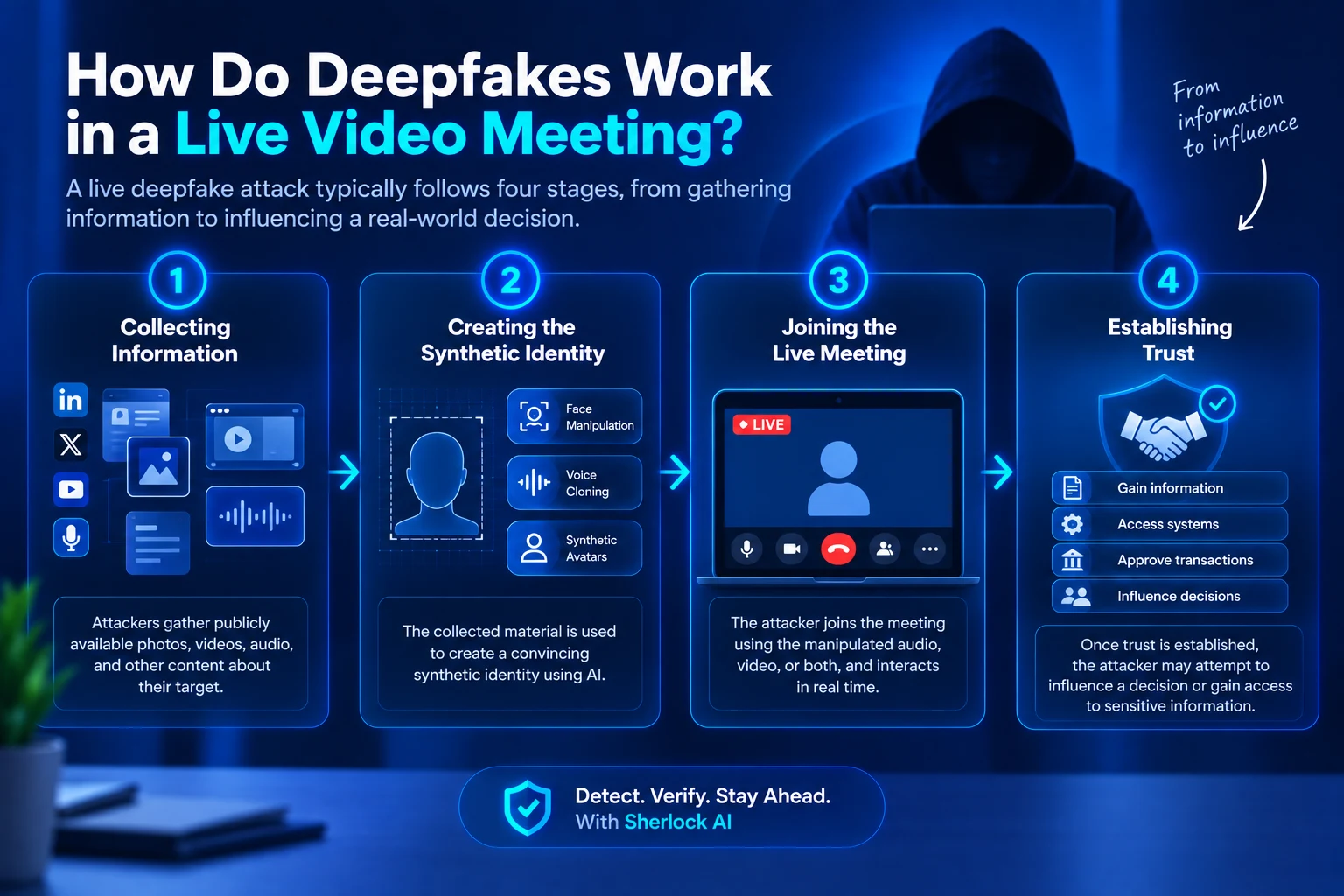
A live deepfake attack typically starts with an attacker gathering information about the person they want to impersonate. AI can then be used to create or support a synthetic representation of that person and introduce it into a live video meeting.
The attack generally follows four stages:
1. Collecting Information About the Target
Attackers may gather publicly available photographs, videos, interviews, speeches, podcasts, social media content, or other recordings of their target.
This material can provide information about the person's appearance and voice, which can be used to create a more convincing synthetic representation.
2. Creating the Synthetic Identity
The collected material can be used to create or support a synthetic identity. Depending on the attack, this may involve facial manipulation, voice cloning, synthetic avatars, or a combination of these techniques.
The objective is to make the manipulated identity appear and sound convincing during a live interaction.
3. Joining the Live Meeting
The attacker then enters the meeting using the manipulated audio, video, or both. They may respond to questions, maintain eye contact, move naturally, and participate in the conversation to make the interaction appear legitimate.
Because the manipulation happens in real time, other participants may have little reason to suspect that the video or audio has been altered.
4. Establishing Trust
Once the apparent identity is accepted, the attacker may attempt to influence a decision or gain access to sensitive information.
Depending on the target, this could involve obtaining confidential information, changing account details, accessing systems, approving a transaction, or influencing a hiring decision.
The real risk is therefore not simply that the video is artificial. The greater risk is that the manipulated interaction is used to establish trust and influence a real-world decision.
10 Signs of a Deepfake During a Live Video Meeting
There is no single visual or audio clue that can reliably prove someone is using a deepfake. Instead, look for multiple inconsistencies across facial movement, voice, lip synchronization, video quality, identity continuity, and behavior.
A single anomaly may be caused by poor lighting, network latency, or camera limitations. However, when several independent signals appear together or persist throughout the conversation, additional verification becomes more important.
1. Unnatural Lip Synchronization
One of the earliest warning signs is when a participant's mouth movements do not consistently match their speech. The lips may appear slightly ahead of or behind the audio, or the mouth may not form natural shapes while speaking. A brief mismatch can be caused by network latency, so repeated synchronization problems are more significant than an isolated delay.
Example: A participant says, “I approved the payment yesterday,” but their lip movements consistently appear slightly behind the audio throughout the conversation.
2. Inconsistent Facial Movement
A manipulated face may reproduce basic expressions while struggling with more natural facial movements. The mouth, cheeks, jaw, or eyebrows may appear unusually stiff, delayed, or disconnected from the person's speech. Repeated inconsistencies across different expressions can be more meaningful than a single unusual movement.
Example: A participant laughs during a conversation, but only their mouth appears to move while the rest of their face remains unusually static.
3. Distortions Around the Face
Pay attention to areas where a synthetic face may blend with the surrounding image, including the hairline, ears, jawline, neck, glasses, and facial hair. Blurring, flickering, unstable edges, or changing facial textures during movement can be potential warning signs.
Example: When a participant turns their head, the area around their jaw or ear briefly becomes blurry or distorted before returning to normal.
4. Lighting and Shadow Inconsistencies
A genuine face should generally interact naturally with the lighting in its environment. Watch for shadows that do not match the room's lighting, highlights that appear out of place, or facial brightness that changes unnaturally when the participant moves.
Example: A participant moves closer to a bright window, but the lighting on their face remains unchanged while the surrounding room becomes noticeably brighter.
5. Unusual Eye or Gaze Behavior
Eyes can provide another signal when evaluating a suspicious video. Look for unusually fixed gaze patterns, inconsistent eye alignment, unnatural blinking, or reflections that do not appear to match the surrounding environment. Because eye behavior varies naturally between individuals, this should never be treated as conclusive evidence on its own.
Example: A participant maintains an unusually fixed gaze toward the camera throughout the meeting, even when responding to different people or looking around the room.
6. Voice and Facial Expression Mismatch
A person's voice and facial expressions normally work together during a conversation. If the voice conveys strong emotion while the face remains unusually static, or the emotional tone consistently feels disconnected from visible expressions, the interaction may deserve closer examination.
Example: A participant sounds surprised or excited when answering a question, but their facial expression remains almost completely unchanged.
7. Sudden Changes in Video Quality
Unexpected changes in facial sharpness, texture, or overall video quality can sometimes indicate manipulation. A face may suddenly become blurry, flicker, or change appearance without an obvious environmental reason. However, changing bandwidth, compression, or webcam limitations can produce similar effects.
Example: A participant's face suddenly becomes noticeably softer or blurry whenever they begin speaking and returns to normal when they stop.
8. Identity Continuity Problems
A participant's appearance and voice should remain reasonably consistent throughout the meeting. Unexpected changes in facial proportions, skin texture, voice characteristics, or other identity-related features may indicate that additional verification is needed. This is particularly important during remote interviews, where the participant's identity should remain consistent from start to finish.
Example: A candidate looks consistent at the beginning of an interview but later appears to have slightly different facial proportions or a noticeably different voice that cannot be explained by lighting or camera position.
9. Unnatural Live Interaction
Real conversations include interruptions, unexpected questions, pauses, changes in tone, and spontaneous reactions. Unusually delayed responses, repeated expressions, unnatural pauses, or reactions that seem disconnected from what others are saying can provide additional behavioral signals.
Behavior alone cannot prove that a participant is using a deepfake, but it can become more meaningful when combined with technical inconsistencies.
Example: An interviewer asks an unexpected follow-up question, but the participant repeatedly takes an unusually long pause before responding or gives an answer that does not appear connected to the question.
10. Suspicious Context or Requests
Deepfake detection should not focus only on technical signals. The context of the interaction matters too. Be especially cautious if someone who appears authentic suddenly requests money, confidential information, credentials, account access, or another high-risk action.
Example: Someone appearing to be a company executive urgently asks an employee to transfer money or share sensitive credentials during a video call.
No individual sign should automatically be treated as proof of a deepfake. Stronger conclusions come from multiple signals appearing together, followed by appropriate identity verification and independent confirmation when the situation is high-risk.
What to Check When Detecting a Deepfake
Identifying a potential deepfake requires looking beyond a person's face. A stronger assessment considers whether the participant's face, voice, movements, identity, and behavior remain consistent throughout the meeting.
Rather than relying on one unusual signal, evaluate multiple aspects of the interaction together.
What to Check | What to Look For | Example |
|---|---|---|
Face | Unusual facial movement, proportions, or distortions | Facial features change when the participant turns their head |
Voice | Unexpected changes in tone, rhythm, pronunciation, or vocal characteristics | The person's voice suddenly sounds different midway through the meeting |
Lip Synchronization | Repeated mismatch between speech and mouth movement | Audio consistently starts before the lips move |
Lighting & Environment | Shadows, reflections, or facial lighting that don't match the surroundings | Face lighting stays unchanged when the participant moves toward a window |
Identity Continuity | Changes in appearance or voice during the session | A candidate's facial proportions appear different later in the interview |
Meeting Behavior | Unusual pauses, reactions, or responses to unexpected questions | Participant repeatedly struggles to respond naturally to unexpected follow-ups |
The goal is not to identify one “perfect” deepfake signal. Instead, evaluate multiple signals together and escalate to additional identity verification when several inconsistencies appear or when the interaction involves a high-risk decision.
How Can You Verify Someone if You Suspect a Deepfake?
Spotting a suspicious signal is only the first step. If a video meeting involves sensitive information, financial decisions, access changes, or other high-risk actions, the next step is to verify the person's identity through a trusted channel.
The key principle is simple: do not use the suspicious communication itself to verify the person's identity.
Pause High-Risk Actions
If someone on a video call asks you to transfer money, share confidential information, provide credentials, change account access, or take another sensitive action, pause before proceeding.
Urgency should never replace established verification procedures. The greater the potential impact of the request, the stronger the verification process should be.
Use an Independent Communication Channel
Contact the person through a communication method that was already established and trusted before the meeting.
For example, if an executive makes an unusual request during a video call, contact them through their known company account or a previously verified phone number rather than using contact details provided during the suspicious interaction.
Ask Unexpected Questions
Ask questions that require natural, spontaneous responses rather than relying only on prepared information.
Unexpected questions can provide another signal about whether the person is responding naturally. However, a single question should never be treated as proof of identity. It should be considered alongside other verification methods.
Compare Previous Interactions
If previous video or audio interactions are available, compare the current meeting with those interactions.
Look for meaningful differences in voice, appearance, communication style, or behavior. A single change may have a normal explanation, but several unexplained changes occurring together may warrant additional verification.
Use Automated Detection
Automated detection systems can continuously analyze video and audio during a live meeting and identify suspicious patterns that may be difficult for participants to notice. For remote interviews, deepfake interview detection can provide additional evidence for investigating potential synthetic media and identity fraud.
This can help identify suspicious moments or patterns that people may overlook during a live meeting and provide additional evidence for human reviewers. Automated detection works best as part of a layered verification process rather than as a replacement for human judgment.
The goal is not simply to decide whether a video “looks real.” The goal is to establish that the person on the call is who they claim to be before taking an action that could create significant risk.
Deepfake Detection vs. Traditional Identity Verification
Traditional identity verification and deepfake detection solve different parts of the identity problem.
Identity verification focuses on who a person claims to be, while deepfake detection focuses on whether the audio or video being presented has been manipulated. For high-risk video meetings, organizations may need both.
Approach | What It Verifies | What It Can Miss |
|---|---|---|
Traditional Identity Verification | Identity documents, credentials, photographs, biometrics, and other identity attributes | Whether the person or media appearing during the live meeting has been manipulated |
Deepfake Detection | Signs of synthetic or manipulated audio and video, including facial inconsistencies, voice anomalies, lip-sync issues, and video artifacts | The actual identity of the person behind the manipulated media |
Combined Approach | Both the person's identity and the authenticity of the live interaction | Provides a more comprehensive verification process when multiple signals and checks are used |
Why Both Are Needed
A person may have valid identification while someone else appears as them during a video meeting. Similarly, detecting manipulated media does not automatically establish who is behind the impersonation.
Combining identity verification with deepfake detection creates a stronger security process by verifying both the person and the authenticity of the interaction.
According to Entrust "a deepfake attack occurred approximately every five minutes in 2024 based on its analysis of identity verification activity." |
|---|
What Is the Best Way to Detect a Deepfake in a Live Video Meeting?
The most effective way to detect a deepfake during a live video meeting is to use a layered detection approach. Instead of relying on one visual clue, evaluate multiple signals across the person's face, voice, lip synchronization, video quality, identity continuity, and behavior.
A practical deepfake detection process can include the following steps:
Monitor Facial and Visual Signals
Look for unusual facial movements, distortions around the face, inconsistent lighting, unnatural eye movement, or changes in facial appearance during the meeting.
Example: A participant turns their head, but their facial features appear slightly distorted or do not move naturally with the rest of their face.
Analyze Voice and Lip Synchronization
Compare the person's speech with their mouth movements and listen for unusual changes in voice quality, tone, rhythm, or pronunciation.
Example: The participant's voice continues naturally, but their lips repeatedly move slightly before or after the corresponding words are heard.
Check Identity Continuity
Pay attention to whether the person's appearance, voice, and other identity characteristics remain consistent throughout the meeting.
Example: A candidate's facial appearance or voice sounds noticeably different after reconnecting to the same interview, even though the person claims nothing has changed.
Evaluate Real-Time Interaction
Observe how naturally the participant responds to unexpected questions, interruptions, changes in conversation, or requests for clarification.
Example: During an interview, the recruiter asks an unexpected follow-up question, and the participant repeatedly shows unusual delays or unnatural responses.
Use Automated Deepfake Detection
Automated detection systems can continuously analyze video and audio during a live meeting and identify suspicious patterns that may be difficult for participants to notice.
Example: A detection system flags several moments where facial movement, audio characteristics, and video frames show inconsistencies during an interview.
Verify High-Risk Identities Independently
When multiple suspicious signals appear or when the meeting involves a high-impact decision use an independent communication channel or additional identity verification method.
Example: An executive appears to request an urgent financial transfer during a video call. Instead of acting immediately, the employee contacts the executive through their known company phone number to confirm the request.
In short, effective live deepfake detection is not about finding one obvious flaw. It is about identifying multiple signals, evaluating them in context, and verifying the person's identity before trusting a high-risk interaction.
How Sherlock AI Helps Detect Deepfakes in Live Video Meetings
Sherlock AI helps organizations detect potential deepfake and identity fraud by analyzing multiple audio, video, and behavioral signals instead of relying on a single visual indicator.
This makes it particularly useful for remote interviews and other high-risk video interactions where organizations need stronger evidence that the person on screen is genuine.
Multimodal Deepfake Analysis
Deepfakes can manipulate both video and audio. Sherlock AI's deepfake interview detection analyzes multiple authenticity signals, including facial consistency, voice characteristics, lip synchronization, video artifacts, and identity-related indicators.
This provides a broader view of the interaction and reduces reliance on a single deepfake detection signal.
Continuous Identity Monitoring
A participant may appear genuine at one point in a meeting but show inconsistencies later.
Sherlock AI can analyze identity-related signals throughout the interaction to help identify changes in facial appearance, voice, or other characteristics that may require further investigation.
Audio and Video Synchronization
In a genuine live interaction, speech and facial movement should maintain a natural relationship.
Sherlock AI analyzes audio-visual signals to identify potential synchronization anomalies, helping reviewers investigate situations where the participant's voice and visible movements do not appear naturally connected.
Video Fraud Analysis
Sherlock AI also supports video fraud analysis for recorded video, helping identify relevant fraud signals and suspicious moments.
Instead of providing only a broad fraud classification, the analysis can associate findings with specific moments in the video, making it easier for reviewers to investigate what happened.
Evidence-Based Review
A detection result is more useful when reviewers can understand why an interaction was flagged.
Sherlock AI organizes relevant signals into an evidence trail, helping recruitment, security, and compliance teams review suspicious interactions more systematically and make informed decisions.
Built for Remote Interviews
Remote interviews can expose organizations to identity impersonation, deepfakes, and other forms of candidate fraud.
Sherlock AI combines deepfake analysis with broader candidate fraud detection to help organizations investigate identity continuity, response authenticity, and other potential interview fraud signals.
Conclusion
Deepfake technology is changing how organizations approach identity verification during live video meetings. Seeing a familiar face or hearing a familiar voice can create a strong sense of trust, but neither should automatically be treated as proof that the person on screen is genuine. Effective deepfake detection requires multiple signals, including facial movement, lip synchronization, voice characteristics, video artifacts, identity continuity, and behavior.
A single anomaly does not necessarily indicate a deepfake. A blurry frame, brief audio delay, or unusual facial movement can have a legitimate technical explanation. However, repeated inconsistencies across multiple signals can indicate that additional verification is necessary. For high-risk meetings and remote interviews, organizations should combine automated detection with independent identity verification to reduce the risk of impersonation and fraud.
Sherlock AI adds another layer of protection by analyzing video, audio, identity, and other authenticity signals. By combining automated analysis with evidence-based human review, organizations can move beyond simply asking whether someone looks real and instead evaluate whether the overall interaction is consistent with an authentic person.
Detect Deepfakes Before They Impact Your Organization See how Sherlock AI can help protect your interviews and video meetings from AI-powered fraud. |
|---|
Frequently Asked Questions
Can Deepfakes Be Used During Live Video Meetings?
Yes. AI can manipulate a person's face, voice, or entire video feed in real time, allowing attackers to impersonate another person during a live meeting.
How Can I Tell If Someone Is Using a Deepfake on a Video Call?
Look for multiple inconsistencies in facial movement, lip synchronization, voice, lighting, video quality, identity continuity, and behavior. No single sign should be treated as conclusive proof of a deepfake.
What Is the Biggest Sign of a Deepfake During a Video Meeting?
There is no single universal sign. Repeated lip-sync issues, facial distortions, unusual voice behavior, identity changes, and other inconsistencies are more meaningful when several appear together.
Can Asking Someone to Move Expose a Deepfake?
Unexpected movement can sometimes reveal weaknesses in a deepfake system. However, movement tests are not a reliable detection method on their own because deepfake technology continues to improve.
Is Poor Video Quality Proof of a Deepfake?
No. Poor video quality can result from network issues, webcam limitations, compression, or lighting. It becomes more significant when combined with other suspicious audio, video, or behavioral signals.
Can Voice Cloning Be Used With a Video Deepfake?
Yes. Voice cloning can be combined with facial manipulation to create a more convincing impersonation. This is why both audio and video should be evaluated when detecting potential deepfakes.
Can a Deepfake Pass a Normal Video Identity Check?
Yes. A sophisticated deepfake may appear convincing during a basic visual identity check. Organizations should combine identity verification with continuous media authenticity analysis, especially for high-risk interactions.
What Should I Do If I Suspect a Deepfake?
Pause any sensitive action and do not rely on the suspicious meeting to verify itself. Contact the person through an established communication channel and independently verify any high-risk request.
Can AI Detect Deepfakes During Live Meetings?
Yes. AI-based detection systems can analyze audio and video for signals associated with synthetic or manipulated media. However, no detection system is perfect, so organizations should combine automated analysis with human review and other verification methods.
Can Sherlock AI Help Detect Deepfake Interview Fraud?
Yes. Sherlock AI analyzes video, audio, identity continuity, and other signals associated with potential interview fraud. Its deepfake interview detection capabilities can help organizations identify and investigate suspicious remote interviews and make more evidence-based hiring decisions.