Back to all blogs
Learn how facial recognition works, including face detection, verification, identification, real-world applications, benefits, and limitations.


Think about how often a camera sees your face without you having to do anything. You might unlock your phone, verify your identity while signing up for a service, or complete an online interview where your identity needs to be checked. These actions can feel almost instant, but have you ever wondered how facial recognition works behind the scenes?
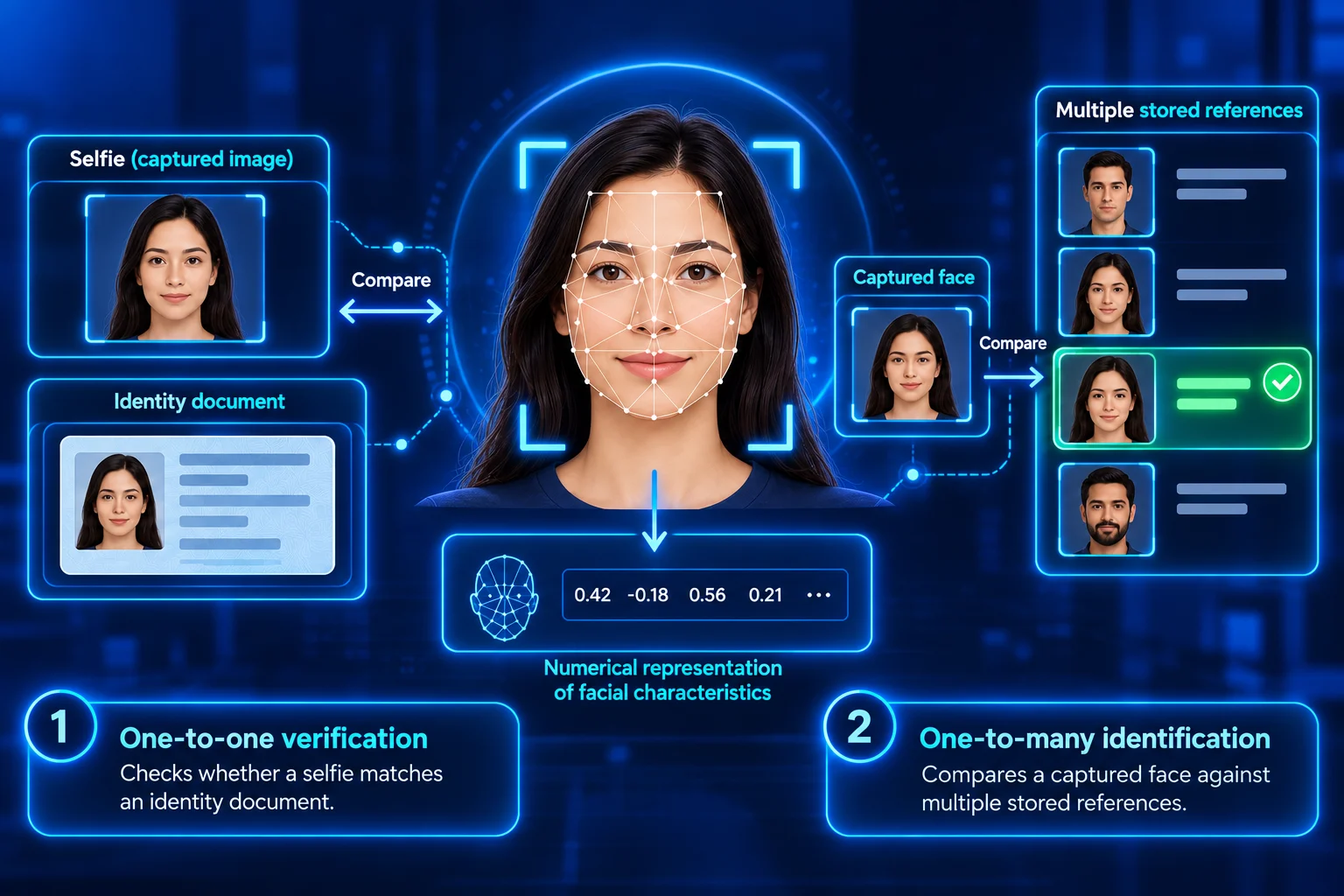
Facial recognition is a biometric technology that analyses a person's facial characteristics to verify or identify their identity. Rather than simply comparing two photographs visually, modern systems extract facial information and convert it into numerical representations that can be compared mathematically.
The scale of facial recognition research shows how extensively these systems have been evaluated. In a 2019 study, the National Institute of Standards and Technology (NIST) evaluated facial recognition algorithms using 18.27 million images of 8.49 million people.
Artificial intelligence and machine learning have advanced facial recognition technology, enabling systems to analyse facial patterns across images with differences in lighting, pose, expression, and quality. However, these variations can still affect recognition performance, making it important to understand how facial comparisons are performed and interpreted.
This article explains how facial recognition works, from face detection and feature extraction to numerical representation and matching. It also explores facial verification, identification, real-world applications, benefits, and limitations.
What Is Facial Recognition?
Facial recognition is a biometric technology that uses a person's facial characteristics to verify a claimed identity or identify an individual. It works by analysing facial information from an image or video and comparing it with reference data.
Unlike simply storing or viewing a photograph, facial recognition technology generates a numerical representation of facial characteristics that can be compared mathematically. This representation helps the system assess how closely two facial images correspond.
Depending on its purpose, facial recognition can support one-to-one verification, such as checking whether a selfie matches an identity document, or one-to-many identification, where a captured face is compared against multiple stored references.
Face Detection vs Facial Recognition
Face detection and facial recognition are closely related technologies, but they serve different purposes. Face detection identifies whether a face is present in an image or video, while facial recognition analyses facial information to help verify or identify a person.
Aspect | Face Detection | Facial Recognition |
|---|---|---|
Purpose | Determines whether a face is present in an image or video. | Helps verify or identify a person by comparing facial information. |
How It Works | Locates the facial region without establishing identity. | Extracts facial information and compares it with reference facial data. |
Identity Verification | Does not determine who the person is. | Can verify a claimed identity or identify possible matches. |
Example | A phone camera detects a face and places a box around it. | An identity verification system compares a selfie with an identity document photograph. |
Key Question | Where is the face? | Does this face match the expected person, or who might this person be? |
Facial Verification vs Facial Identification
Facial recognition can perform two different matching tasks: facial verification and facial identification. Facial verification uses one-to-one matching to confirm a claimed identity, while facial identification uses one-to-many matching to search for possible matches among stored facial references.
Aspect | Facial Verification | Facial Identification |
|---|---|---|
Purpose | Checks whether a captured face matches a claimed identity. | Searches for possible identity matches among stored facial references. |
Matching Type | One-to-one (1:1) comparison. | One-to-many (1) comparison. |
How It Works | Compares a captured face with the reference associated with a claimed identity. | Compares a captured face against multiple facial references in a database. |
Example | During online onboarding, a live selfie is compared with the photograph on a submitted identity document. | A system compares a captured face against an authorised collection to identify possible candidates. |
Key Question | Is this the person they claim to be? | Who might this person be? |
Facial verification assesses whether two facial representations meet the required matching criteria, while facial identification may return one or more possible candidates for further assessment. In both cases, the results should be interpreted within the wider identity verification process rather than treated as conclusive proof of identity.
How Does Facial Recognition Work?
Facial recognition works by detecting a face, analysing its characteristics, converting facial information into numerical data, and comparing that data with a reference. This process can support device authentication, identity verification, access control, and identity checks during remote onboarding.
1. Face Detection
The process begins when a camera captures an image or video frame and the software detects the presence of a face.
Face detection locates the facial region within the image so it can be processed further. At this stage, the system only determines that a face is present; it does not establish the person's identity.
For example, during a remote interview, the system may first detect the candidate's face in the webcam feed before carrying out further identity checks.
2. Face Analysis
Once the face has been detected, the system processes the facial region to prepare it for recognition.
This may involve locating facial landmarks, aligning the face, and adjusting the image to make comparisons more consistent. Modern facial recognition systems also use trained machine learning models to analyse facial patterns rather than relying only on measurements of features such as the eyes, nose, and mouth.
For example, the system may locate facial landmarks to align a candidate's face before comparing it with a reference image.
3. Converting the Image into Data
After the face has been processed, the recognition system converts its visual information into numerical data that can be analysed mathematically.
This numerical representation is commonly called a facial embedding or template. It captures learned facial patterns in a form that allows the system to compare different images without relying on identical photographs.
For example, a selfie submitted during identity verification can be converted into a facial embedding and compared with an embedding generated from a passport photograph.
4. Finding a Match
The facial data from the captured image is compared with reference facial data available to the system.
The reference may come from an enrolled device profile, an identity document photograph, or another authorised image source. The system calculates a similarity score or another matching measure and evaluates the result against the matching criteria. For identification, it may search multiple references and return possible candidates.
For example, during candidate verification, a live selfie may be compared with the photograph on a submitted identity document to assess whether both images are likely to show the same person.
A facial recognition result should be interpreted as part of the wider identity verification process. An unsuccessful comparison does not automatically indicate impersonation, because factors such as image quality, lighting, camera angle, movement, or changes in appearance can affect the result.
2D vs 3D Facial Recognition
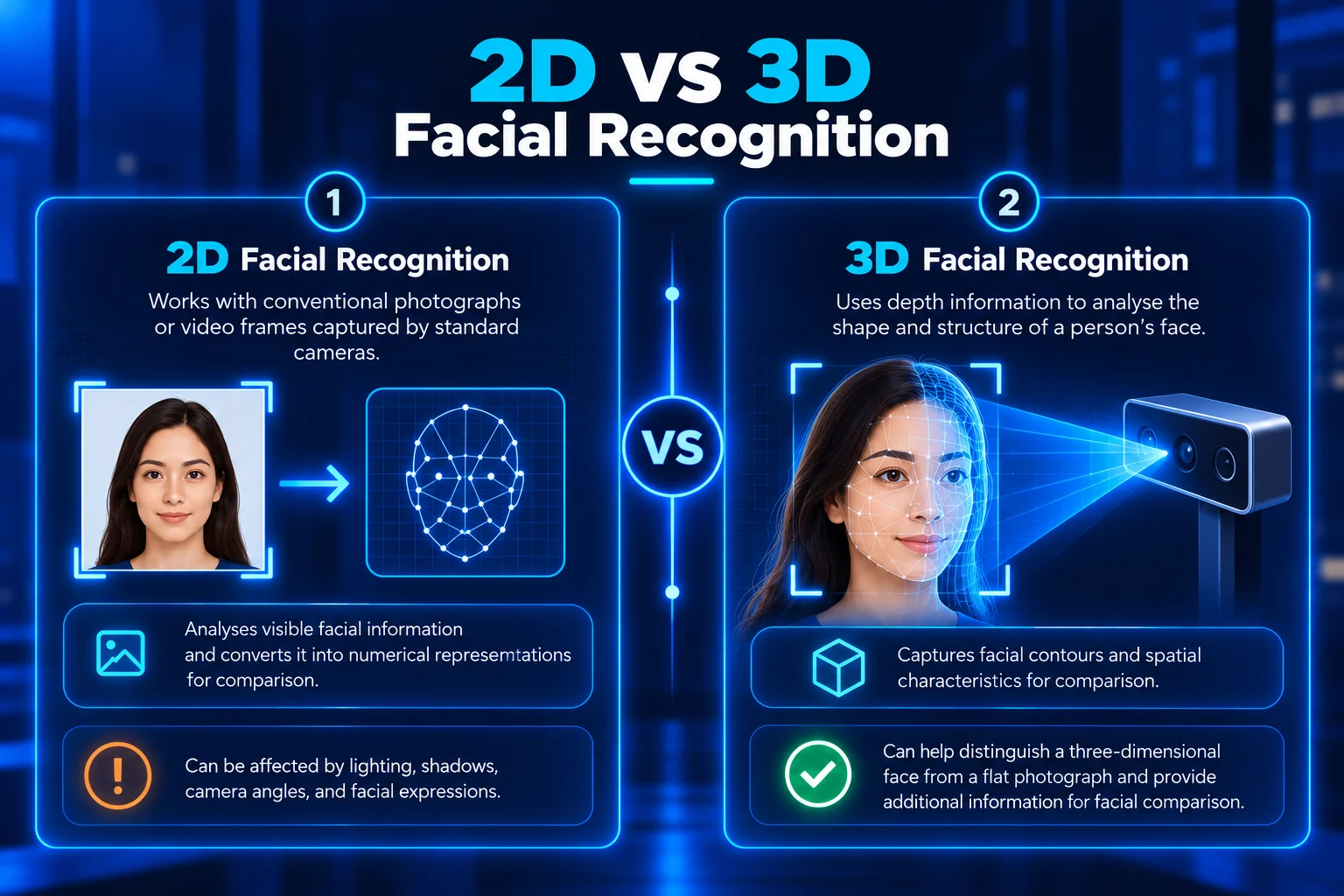
Facial recognition systems can use different types of facial information depending on the camera and sensors involved. 2D facial recognition analyses flat images, while 3D facial recognition uses depth information to assess the physical structure of a face. Both approaches can support facial verification or identification, depending on the application.
1. 2D Facial Recognition
2D facial recognition works with conventional photographs or video frames captured by standard cameras. It analyses facial information visible in these images and converts it into numerical representations for comparison with reference data.
Because 2D images do not directly capture facial depth, factors such as lighting, shadows, camera angles, and changes in facial expression can affect the information available for recognition.
2. 3D Facial Recognition
3D facial recognition uses depth information to analyse the shape and structure of a person's face. Specialised sensors can capture facial contours and spatial characteristics that conventional 2D photographs do not directly provide.
Depth information can help certain systems distinguish a three-dimensional face from a flat photograph and provide additional information for facial comparison. However, this does not mean that every 3D facial recognition system is automatically more accurate or secure than a 2D system.
The effectiveness of either approach depends on the recognition model, sensor quality, reference data, capture conditions, and additional security controls. While 2D and 3D describe the type of facial information used, verification and identification describe the matching task being performed.
Where Liveness Detection Fits
Liveness detection in facial recognition helps assess whether a facial capture comes from a live person rather than an attempted spoof. This is particularly important during remote identity verification, where a face may resemble a reference image even when the genuine person is not physically present.
Liveness detection can help identify presentation attacks involving printed photographs, displayed images, replayed videos, or other representations of a person's face. Some systems use active checks that ask users to perform an action, while others use passive checks that analyse the capture without requiring an explicit movement.
Liveness detection and facial verification serve different purposes. Facial verification assesses whether a captured face matches a reference, while liveness detection evaluates whether the biometric presentation appears to come from a live person.
Passing one check does not guarantee the other. A live person may attempt to use someone else's identity, while a matching facial image may be presented through a spoofing attempt. Using both checks can provide stronger evidence during identity verification, although their effectiveness depends on the system's capabilities and the types of attacks it is designed to detect.
Facial Recognition Examples in Real Life
Facial recognition is used in different environments to support identity verification, authentication, and access control. Common applications include smartphones, digital onboarding, airports, secure facilities, and remote interviews. The way facial recognition is used depends on the available reference data and the purpose of the identity check.
1. Facial Recognition in Smartphones and App Authentication
Facial recognition allows supported smartphones and applications to authenticate users by comparing a current facial capture with an enrolled profile. This provides a convenient way to unlock devices or access applications without repeatedly entering passwords or passcodes.
When facial authentication is unsuccessful or unavailable, users may be required to complete an alternative authentication step, such as entering a passcode.
2. Facial Recognition in Online Identity Verification
Online identity verification systems can use facial recognition to compare a person's selfie with the photograph on a submitted identity document. This helps businesses assess whether the individual completing the onboarding process matches the person represented in the document.
Facial comparison can also work alongside document verification and liveness detection to provide additional evidence during remote identity checks.
3. Facial Recognition in Airports and Access Control
Airports and secure facilities may use facial recognition to support identity checks at checkpoints, boarding areas, or restricted entrances. Depending on the implementation, the system may compare a traveller's face with an authorised passport image, enrolled profile, or access record.
Facial recognition can support these checks, but access decisions may also depend on travel documents, permissions, or other security requirements.
4. Facial Recognition in Remote Interviews
Remote interview platforms can use facial recognition to help verify whether the person attending an interview matches an identity reference collected during an earlier verification step.
This can help hiring teams assess identity continuity during remote interviews, particularly when candidates and recruiters are in different locations. However, facial recognition does not evaluate a candidate's qualifications, skills, experience, or suitability for a role.
5. Other Applications
Facial recognition is also used in workplace attendance systems, banking, healthcare administration, retail services, building security, and certain public-sector applications. Depending on the use case, it may support authentication, identification, or access-related decisions.
Its suitability depends on the purpose of the application, applicable legal requirements, privacy safeguards, and the consequences of an incorrect match.
What Are the Benefits of Facial Recognition?
Facial recognition can make identity-related processes more convenient, efficient, and consistent by automating facial comparisons. Its benefits depend on how the technology is implemented, the quality of the reference data, and how recognition results are used within the wider verification process.

1. Convenient Authentication
Facial recognition allows enrolled users to authenticate themselves without repeatedly entering passwords or passcodes. A camera-based process can make routine access more convenient when capture conditions are suitable and the system performs reliably.
For example, a user may unlock a supported smartphone by looking at it instead of entering a passcode during every interaction.
2. Faster Processing
Automated facial recognition can complete straightforward facial comparisons more quickly than repeated manual checks. This can help businesses process routine identity verification requests while directing uncertain or inconsistent results for additional review.
The actual time saved depends on factors such as image quality, system performance, and how frequently manual intervention is required.
3. Support for Remote Identity Verification
Facial recognition allows organisations to compare facial information when the individual and the reviewer are not physically present in the same location.
For example, during digital onboarding, a selfie can be compared with the photograph on a submitted identity document to assess whether both images are likely to show the same person.
This provides additional evidence during remote identity checks without requiring every applicant to attend an in-person verification appointment.
4. Reduced Manual Image Comparison
Facial recognition can reduce the need for employees to manually compare every pair of facial images during identity verification. Automated systems can perform initial comparisons, allowing reviewers to focus on uncertain matches, poor-quality captures, and discrepancies that require further assessment.
This can reduce repetitive administrative work while preserving human oversight for cases where automated results are insufficient.
5. Integration With Other Identity Checks
Facial recognition can work alongside document verification, liveness detection, and other identity controls to support a more comprehensive verification process.
Each check serves a different purpose. Facial recognition assesses facial similarity, document verification evaluates the authenticity and validity of submitted identity evidence, and liveness detection helps determine whether the facial capture appears to come from a live person.
Combining these checks can provide stronger evidence for identity-related decisions than relying on facial resemblance alone, although no individual check guarantees that an identity claim is genuine.
What Are the Limitations of Facial Recognition?
Facial recognition can support authentication and identity verification, but its accuracy and reliability depend on the recognition model, image quality, reference data, and operating conditions. Understanding the limitations of facial recognition helps organisations assess potential risks and determine when additional verification or human review may be necessary.
1. Image Quality Can Affect Accuracy
Poor lighting, blurred images, extreme camera angles, low resolution, movement, or facial coverings can reduce the quality of information available for facial comparison.
These conditions may result in weaker matching scores or cause the system to fail to recognise the same person correctly. Requesting a clearer image or another capture may be more appropriate than treating an unsuccessful match as evidence of impersonation.
2. False Matches and False Non-Matches Can Occur
Facial recognition systems are not error-free and may produce incorrect matching results.
A false match occurs when the system incorrectly treats two different people as the same person. A false non-match occurs when images of the same person fail to meet the required matching criteria.
The likelihood of these errors depends partly on the recognition model, image quality, and matching threshold. Adjusting the threshold can change the balance between false matches and false non-matches.
The consequences of an incorrect result vary depending on whether facial recognition is used for device authentication, customer onboarding, recruitment, or other identity-related decisions.
3. Performance Can Vary Across Demographic Groups
Facial recognition accuracy may differ across demographic groups depending on the algorithm, training and evaluation data, image quality, and capture conditions.
When a system is not adequately evaluated across the populations and environments in which it will operate, differences in error rates may go unnoticed. These variations can affect the reliability of identity checks for different users.
Organisations should therefore evaluate recognition systems using representative data and monitor their performance under relevant operating conditions.
4. Privacy and Biometric Data Security Risks
Facial recognition involves processing biometric information closely associated with a person's identity. This creates privacy and security concerns, particularly when facial information is collected, stored, shared, or reused without appropriate safeguards.
Risks can arise from insufficient transparency, unauthorised access, excessive data retention, or the use of biometric information beyond its original purpose.
Organisations should establish clear purposes and appropriate lawful grounds for processing facial data, restrict access, apply suitable security measures, and define retention and deletion procedures in accordance with applicable requirements.
5. Spoofing and Presentation Attacks
A facial match does not automatically confirm that a genuine live person is present during verification.
Attackers may attempt to deceive facial recognition systems using printed photographs, displayed images, replayed videos, masks, or other representations of a person's face.
Liveness detection and presentation attack detection measures can help identify certain spoofing attempts. However, their effectiveness depends on the system's design, testing, and the types of attacks it is intended to detect.
Combining facial recognition with appropriate security controls and additional identity checks can help reduce these risks.
Conclusion
Facial recognition works by detecting a face, analysing its characteristics, generating a numerical representation, and comparing that information with reference data. This process supports applications such as device authentication, remote identity verification, and access control.
However, the reliability of facial recognition depends on factors such as image quality, recognition models, reference data, and matching criteria. An unsuccessful comparison does not necessarily indicate impersonation, and uncertain results may require additional review.
Combining facial recognition with document verification, liveness detection, and appropriate security controls can provide stronger evidence for identity-related decisions. Understanding how these technologies work together helps organisations use facial recognition more effectively while recognising its limitations.