Back to all blogs
Learn what online proctoring is, how it works, its types and key features, and how AI-powered proctoring helps protect online exams, assessments, and remote interviews.


Online proctoring uses software, artificial intelligence, and human oversight to monitor candidates during online exams, assessments, and interviews. Depending on the platform, it may verify identity, analyze video and audio, monitor screen and browser activity, check the testing environment, and flag behavior that may require review.
As education, certification, and hiring continue to move online, organizations need reliable ways to protect assessment integrity without requiring candidates to attend a physical testing center. Online proctoring provides remote oversight while allowing participants to complete evaluations from different locations. This is increasingly relevant as remote and hybrid work remain common.
Modern proctoring goes beyond webcam supervision. It can combine identity verification, environment checks, screen and browser monitoring, audio analysis, and behavioral signals to identify activity that may warrant further investigation. These tools are also being evaluated in response to concerns about unauthorized digital assistance, including generative AI in academic and professional assessments.
Online proctoring is used in education, professional certification, skills assessments, remote hiring, and technical interviews. This guide explains what online proctoring is, how it works, the main types of proctoring, the features that support monitoring, and where traditional approaches may fall short.
What is Online Proctoring?
Online proctoring is the process of monitoring candidates during an online exam, assessment, or interview to help maintain the integrity of the evaluation. It uses software, artificial intelligence, and sometimes human oversight to verify identity, monitor activity, and identify behavior that may require further review.
Depending on the proctoring system, monitoring can include webcam and audio analysis, screen and browser activity, device signals, and checks of the candidate's testing environment. Some platforms also use AI to analyze behavioral patterns and flag potentially suspicious activity.
Online proctoring allows organizations to conduct assessments remotely while maintaining a consistent level of oversight. It is used across education, professional certification, skills assessments, and remote hiring, including technical interviews.
What actually gets monitored?
Online proctoring systems can monitor several aspects of a candidate's session to help maintain assessment integrity. Depending on the platform and the type of assessment, this may include:
Identity and presence: Verifying the candidate's identity and confirming that the authorized person remains present throughout the session.
Webcam and environment: Monitoring the candidate's video feed and surrounding environment for additional people, unauthorized materials, or devices.
Audio: Analyzing microphone input for unexpected voices, conversations, or other sounds that may require review.
Screen activity: Monitoring the candidate's screen for application usage, unauthorized resources, or other activity during the assessment.
Browser activity: Tracking actions such as switching tabs or attempting to access restricted websites.
Device activity: Depending on the system, monitoring relevant device signals or detecting the use of additional devices.
Behavioral signals: Identifying unusual patterns such as repeated distractions, unexpected movements, or other activity that may warrant further investigation.
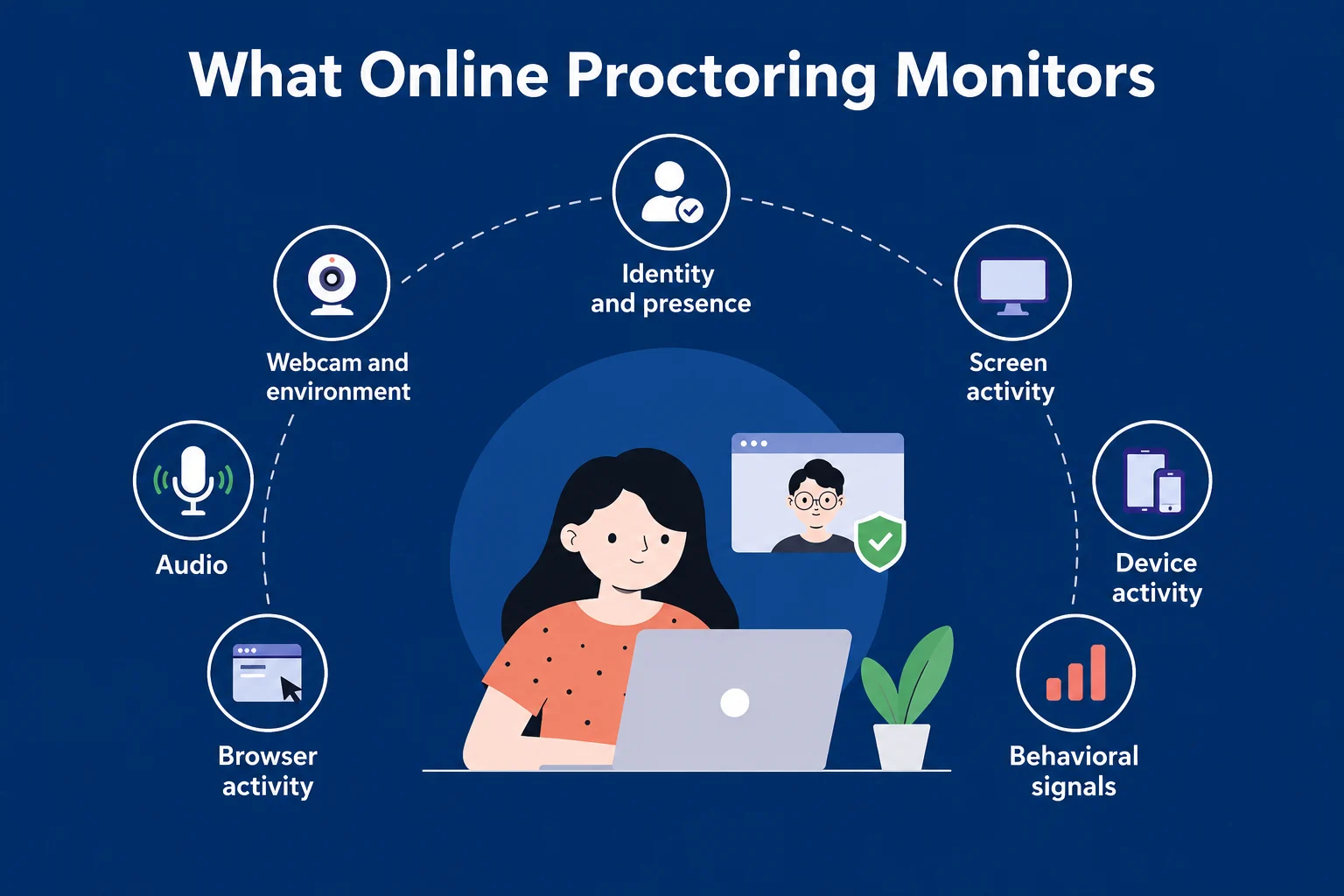
These signals are typically considered together rather than treated as conclusive evidence on their own. When the system identifies potentially suspicious activity, it can flag the session for further review.
From supervision to signal detection
Traditional proctoring largely depended on a human observer watching a candidate throughout an assessment. While this approach can provide direct oversight, it becomes difficult to scale across large numbers of candidates and remote sessions.
Modern online proctoring uses software to collect and analyze multiple signals during an assessment. Instead of relying only on continuous human observation, these systems can identify activity that may require attention and provide reviewers with relevant session data.
This shift from constant supervision to signal-based monitoring makes online proctoring more scalable while allowing human reviewers to focus on sessions or events that require closer examination.
Where online proctoring fits in
Online proctoring sits between remote access and assessment integrity. It allows organizations to conduct exams, assessments, and interviews remotely while adding controls and monitoring that would otherwise be available only in a supervised environment.
For organizations, online proctoring can help provide:
Assessment integrity: Monitoring candidate activity and identifying signals that may require review.
Scalability: Supporting large numbers of candidates without requiring a human proctor for every session.
Consistency: Applying similar monitoring and assessment controls across candidates.
Remote access: Allowing candidates to complete evaluations from different locations.
This makes online proctoring useful across education, certification, skills assessments, and remote hiring. The specific approach depends on the assessment's risk level, candidate volume, and the level of oversight required.
Why Online Proctoring Matters Today
As exams, assessments, and hiring processes move online, organizations need reliable ways to verify identity and maintain assessment integrity without requiring candidates to be physically present. Online proctoring provides a way to monitor remote evaluations while giving organizations evidence that can be reviewed when suspicious activity is detected.
This is particularly important for high-stakes exams, technical assessments, certifications, and remote interviews, where unauthorized assistance can affect the reliability of the results. Modern proctoring systems can combine multiple signals rather than relying on webcam monitoring alone, helping organizations identify activity that may require further review.
The shift to remote evaluation
Hiring and assessments have moved online faster than most teams anticipated.
What used to be:
In-person interviews
On-site technical rounds
Controlled exam environments
Has now become:
Remote interviews across geographies
Asynchronous assessments
High-volume screening processes
This shift brought scale and accessibility.
But it also removed the one thing that made evaluation reliable: control over the environment.
Online proctoring stepped in to fill that gap.
The rise of AI-assisted cheating
Today, a candidate doesn’t need to prepare the same way they did before. They can:
Generate structured answers in seconds
Get real-time help during interviews
Use second devices without being noticed
Rely on AI tools that listen and respond instantly
This changes the nature of the problem.
It’s no longer about someone trying to look up an answer once or twice.
It’s about continuous external assistance throughout the evaluation.
And most traditional interview formats are not built to detect that.
👉 10 Ways to Prevent AI Cheating in Remote Interviews
The gap between performance and actual ability
As a result, a new kind of gap is emerging:
Candidates can sound highly competent
Without necessarily having the underlying depth
Polished answers are easier than ever.
But independent thinking, problem-solving, and real understanding haven’t changed.
This creates a risk for hiring teams, often resulting in bad hires due to AI interview cheating.
Strong interview performance doesn’t always translate to strong on-the-job performance
Decision-making becomes harder to trust
False positives increase
Online proctoring, when done right, helps reduce this gap by adding behavioral context to answers.
Scale is amplifying the problem
Another reason this matters now: volume.
Companies are no longer interviewing a handful of candidates. They’re evaluating:
Hundreds of applicants per role
Across multiple stages
Often simultaneously
At that scale:
Manual monitoring breaks down
Inconsistencies increase
Edge cases get missed
Without structured oversight, it becomes difficult to maintain fairness and integrity across all candidates.
Online proctoring introduces consistency, every candidate is evaluated under a similar set of rules and signals.
The cost of getting it wrong
A weak evaluation process impacts business outcomes.
When integrity breaks down:
Hiring decisions become unreliable
High-potential candidates get filtered out
Underqualified candidates move forward
Teams spend more time correcting bad hires
Over time, this compounds into:
Increased hiring costs
Lower team performance
Slower execution
Which is why proctoring is becoming part of the core evaluation infrastructure.
Types of Online Proctoring
Online proctoring can take different forms depending on how much human involvement is required and how the assessment is monitored. The most common types are live proctoring, automated proctoring, recorded proctoring, and hybrid proctoring. Each approach offers a different balance of oversight, scalability, and review.
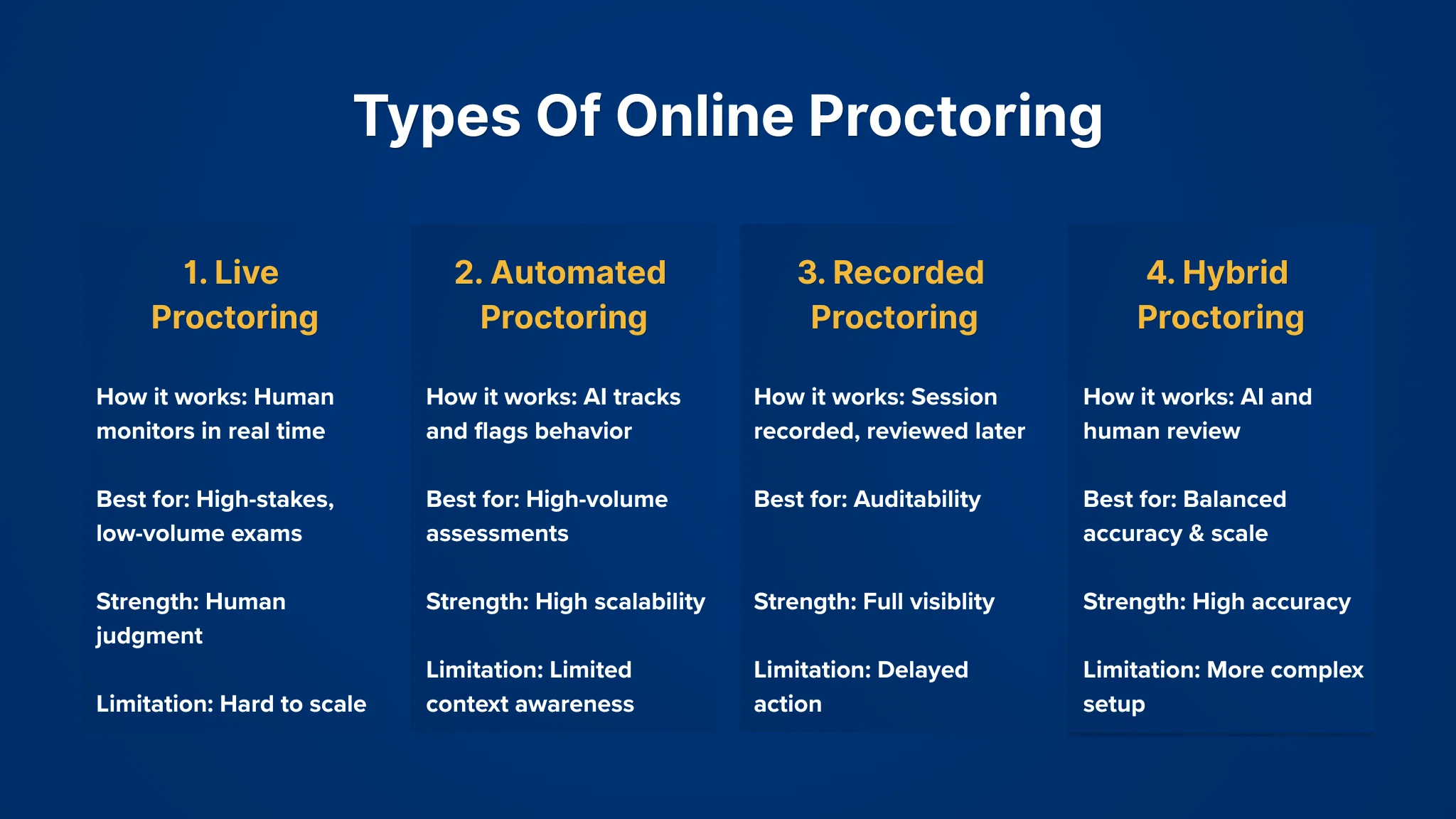
1. Live Proctoring
This is the closest equivalent to a traditional exam setting.
A human proctor monitors candidates in real time through video and audio feeds. They can intervene if something looks off, like ask the candidate to adjust their camera, pause the test, or flag the session.
Where it works well:
High-stakes exams
Certification tests
Low-volume, high-risk evaluations
What you get:
Direct human judgment
Immediate intervention when needed
Higher confidence in edge cases
Where it starts to break:
Doesn’t scale easily
Expensive to run across large volumes
Prone to inconsistency between different proctors
In hiring contexts, this approach is rarely used at scale. It slows things down and adds operational overhead.
2. Automated (AI) Proctoring
This is the most widely used model today, especially for large-scale assessments.
Instead of a human watching every session, the system tracks behavior and flags anything unusual. These flags are based on predefined signals, like tab switching, multiple faces on camera, or suspicious eye movement.
No one is actively monitoring in real time. Everything is recorded, analyzed, and scored.
Where it works well:
High-volume hiring assessments
Early-stage screening
Standardized tests
What you get:
Scalability across thousands of candidates
Consistent rule-based monitoring
Lower operational cost
Limitations to be aware of:
Context can be missed
False positives can happen
Doesn’t always capture more subtle forms of assistance
This is where most modern systems sit but the quality of detection varies a lot depending on how signals are interpreted.
3. Recorded Proctoring (Record & Review)
In this model, sessions are recorded in full, but not actively monitored during the test.
After the assessment, flagged segments are reviewed, either by a human or through additional analysis.
It sits somewhere between live and automated approaches.
Where it works well:
Medium-stakes assessments
Situations where auditability matters
When real-time intervention isn’t necessary
What you get:
Full session visibility
Flexibility in review
Less pressure on real-time infrastructure
Tradeoffs:
Issues are only caught after the fact
Review still requires manual effort
Slower turnaround for final decisions
This model is often used when organizations want a record of the session without committing to live monitoring.
4. Hybrid Proctoring
Hybrid setups combine elements of automated detection with human oversight.
For example:
AI flags suspicious behavior in real time
A human proctor reviews or intervenes only when needed
Or:
Automated monitoring runs throughout
Human review is triggered for high-risk sessions
Where it works well:
High-stakes hiring
Technical interviews
Scenarios where both scale and accuracy matter
What you get:
Better balance between efficiency and judgment
Reduced manual workload
Higher confidence in flagged cases
Challenges:
More complex to implement
Requires coordination between systems and reviewers
Costs can vary depending on how much human involvement is added
Choosing the right approach isn’t straightforward
There’s no single “best” type of proctoring. Each comes with tradeoffs.
In practice, teams often end up using a mix:
Automated systems for early-stage filtering
More controlled setups for later stages
The key is understanding what you’re optimizing for:
Speed
Accuracy
Cost
Candidate experience
Most of the problems with proctoring don’t come from the technology itself, they come from using the wrong approach for the wrong stage.
How Online Proctoring Works
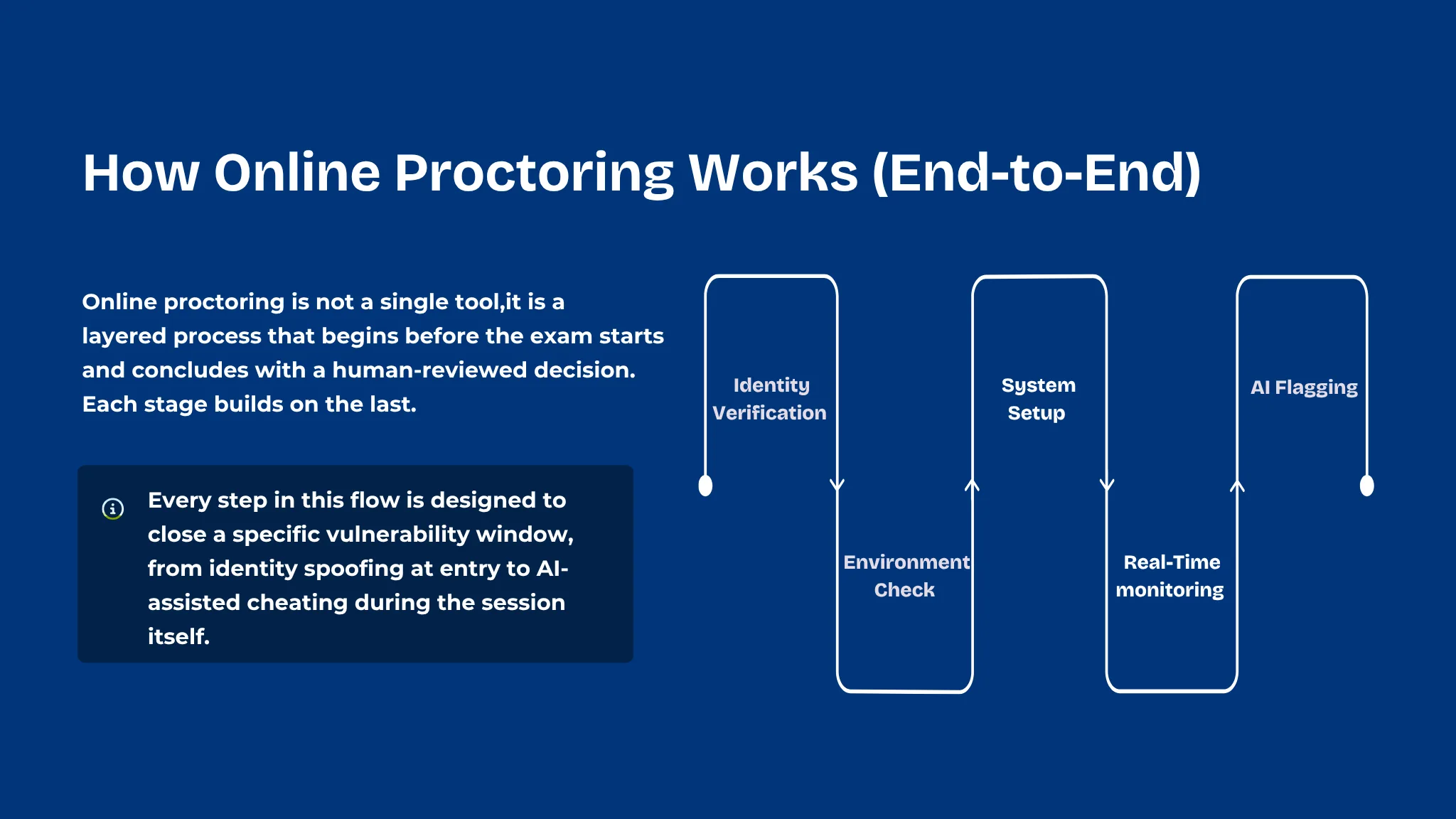
Online proctoring software typically follows a series of checks before, during, and after an assessment. The exact process varies by platform and assessment type, but most systems combine identity verification, environment checks, activity monitoring, and automated or human review to maintain assessment integrity.
A typical online proctoring process includes the following steps:
Step 1: Identity Verification
Before the assessment begins, the system needs to confirm that the right person is taking the test.
This usually involves a combination of:
Uploading a government-issued ID
Capturing a live photo through the webcam
Matching the live image with the ID
In some cases, verifying email, phone, or login credentials
Some systems also introduce liveness checks, simple actions like turning your head or blinking, to ensure it’s not a static image being used.
The goal here is straightforward: Make sure the candidate is who they claim to be.
Step 2: Environment Check
Once identity is confirmed, the system looks at the candidate’s surroundings.
This step is often quick, but it plays an important role.
Candidates may be asked to:
Turn their webcam to show the room
Adjust lighting or camera angle
Ensure their face is clearly visible
Remove any unauthorized materials from the desk
In more controlled setups, the system may also:
Check for additional screens
Verify that no other person is present
Ensure the workspace meets certain guidelines
This step sets the baseline for what’s considered a “clean” environment before the assessment starts.
Step 3: System and Browser Setup
Before the test begins, certain controls are put in place on the candidate’s device.
Depending on the platform, this can include:
Restricting access to other tabs or applications
Enabling a secure browser environment
Disabling copy-paste functions
Preventing screen sharing or recording
Some tools go further and monitor:
Running background applications
Connected devices
Network behavior
This layer is less visible to the candidate, but it’s critical.
It reduces the chances of obvious forms of external assistance.
Step 4: Real-Time Monitoring
Once the assessment starts, monitoring runs continuously in the background.
Multiple signals are tracked at the same time:
Video feed: facial presence, movement, multiple faces
Eye direction: frequent looking away from the screen
Audio: background voices or unusual sounds
Screen activity: tab switches, window changes
Keyboard and mouse patterns: unusual behavior
Individually, these signals don’t mean much.
But when combined, they start to form patterns.
For example:
Repeated tab switching + long pauses + off-screen glances
Consistent audio disturbances during key questions
These patterns are what the system pays attention to, often revealing behavioral signs of cheating during remote interviews
Step 5: Behavior Analysis & Flagging
This is where raw data turns into usable signals.
Instead of recording everything blindly, the system identifies moments that stand out. These are flagged based on predefined rules or behavioral models.
Common flags include:
Multiple faces detected
Candidate leaving the frame
Suspicious eye movement patterns
Attempts to switch tabs or minimize the window
Unexpected audio activity
Each flag is usually tagged with:
A timestamp
A short clip or snapshot
A severity level
Some systems also assign an overall credibility score based on how the session unfolded.
This makes it easier to quickly understand which sessions need attention.
Step 6: Review & Decision Making
After the assessment ends, the flagged data is reviewed.
Depending on the setup:
Fully automated systems generate reports directly
Hybrid systems route flagged sessions for human review
Live proctoring setups may already have notes from real-time monitoring
Reviewers don’t watch the entire session.
They focus only on the flagged segments, which saves time and keeps the process efficient.
Based on this:
The session may be cleared
Marked for further review
Or flagged as compromised
What actually matters in this process
While the steps look linear, the effectiveness of online proctoring depends on a few deeper factors:
Signal quality: Are you tracking meaningful behavior or just surface-level activity?
Context awareness: Can the system distinguish between suspicious and normal behavior?
Noise vs insight: Are you generating useful flags or overwhelming reviewers with false positives?
Two systems can follow the same steps and still produce very different outcomes.
At a high level, online proctoring is not just about watching candidates.
It’s about collecting signals, identifying patterns, and turning them into decisions.
Key Features of Online Proctoring Software
Online proctoring software combines multiple monitoring and verification features to help maintain assessment integrity. Depending on the platform and assessment type, these features can include identity verification, environment checks, screen and browser monitoring, audio analysis, behavioral signals, AI-powered detection, and session reporting.
1. Identity Verification
This is the first layer, making sure the right person is taking the assessment.
Common features include:
ID verification: Candidates upload a government-issued ID which is matched against their live image
Facial recognition / face match: Compares the candidate’s face at the start (and sometimes throughout) with the initial capture
Liveness detection: Prompts simple actions (like blinking or head movement) to prevent spoofing
Login authentication: Email, OTP, or secure credentials to restrict access
If identity itself isn’t reliable, everything that follows becomes questionable. This layer sets the foundation for trust.
2. Environment and Device Checks
Once identity is confirmed, the focus shifts to the candidate’s surroundings and presence.
Features here include:
Webcam monitoring: Continuous video feed to ensure the candidate remains visible
Multiple face detection: Flags if another person appears in the frame
Candidate absence detection: Detects when the candidate leaves the seat or moves out of view
Environment scan (pre-check): Room scan before the test begins
Lighting and visibility checks: Ensures the candidate is clearly visible throughout
A controlled environment reduces obvious risks, like someone else assisting off-camera or stepping in during the test.
3. Screen and Browser Monitoring
This layer focuses on what’s happening on the candidate’s system.
Key features include:
Screen recording: Captures on-screen activity during the assessment
Tab switching detection: Flags when candidates move away from the test window
Application monitoring: Detects unauthorized apps running in the background
Copy-paste restrictions: Prevents content from being copied out or brought in
Multi-monitor detection: Identifies additional connected screens
A large portion of cheating attempts happen through the device itself, such as switching tabs, referencing material, or using external tools.
4. Browser & Access Controls
These are preventive features designed to limit what candidates can do during the test.
They include:
Secure / locked-down browser: Restricts navigation outside the test environment
Disable right-click, shortcuts, and extensions: Reduces ways to access external help
Full-screen enforcement: Prevents minimizing or hiding the test window
Session control: Blocks multiple logins or parallel sessions
Instead of detecting issues after they happen, this layer tries to prevent them from happening in the first place.
5. Audio and Behavioral Analysis
This is where things move beyond basic monitoring into pattern detection.
Features include:
Audio monitoring: Detects voices, conversations, or unusual background noise
Eye movement tracking: Flags repeated off-screen glances
Head pose detection: Identifies frequent shifts in attention
Unusual interaction patterns: Long pauses, inconsistent typing, or erratic behavior
These signals don’t prove cheating on their own. But when combined, they help identify patterns that deserve attention.
6. AI-Based Cheating Detection
This is the layer that ties everything together.
Instead of leaving raw data for manual review, the system highlights what actually matters. AI-based detection can analyze multiple signals during an assessment and identify activity that may require further review. Rather than relying on a single event, modern systems can consider patterns across screen activity, video, audio, browser behavior, and candidate actions.
Typical capabilities include:
Automated flagging of suspicious events
Timestamped clips for quick review
Severity levels for each flag
Session summaries or credibility scores
Some systems also:
Prioritize high-risk sessions
Reduce noise by filtering out low-signal events
Without this layer, proctoring becomes unmanageable at scale. With it, reviewers can focus only on the moments that matter.
7. Session Recording and Reporting
After the session, everything is compiled into a format that teams can act on.
This usually includes:
Detailed session reports
Flag summaries
Video snippets of suspicious activity
Audit logs for compliance
In hiring contexts, this may also tie into:
Candidate evaluation workflows
Decision-making dashboards
Data is only useful if it’s easy to interpret. Good reporting turns raw monitoring into clear signals.
Features alone don’t define effectiveness
Most tools will check off many of these features.
But in practice, what matters more is:
How accurately signals are captured
How well noise is filtered out
How easy it is to act on the output
A system with fewer, well-calibrated signals can outperform one that tracks everything but overwhelms you with irrelevant flags.
At a glance, online proctoring looks like a feature-heavy category.
In reality, it’s about how these features work together to create reliable, usable signals.
Where Online Proctoring Falls Short And What Comes Next
Traditional online proctoring can help detect many common violations, such as unauthorized devices, additional people in the frame, unusual browser activity, or attempts to leave the assessment environment. However, monitoring activity alone does not always explain what is happening or whether a specific action represents genuine misconduct.
As remote assessments and interviews become more sophisticated, candidates may also have access to AI assistants, second devices, deepfake technology, or other forms of external assistance. These situations require systems to look beyond isolated rule violations and consider patterns across multiple signals.
This is where modern AI-powered proctoring can add another layer of analysis. Instead of relying only on predefined rules, AI-based systems can help identify behavioral patterns and prioritize events that may require further human review.
The real gap: surface signals vs actual thinking
Traditional proctoring is built on rule-based detection:
Trigger an alert when something “wrong” happens
Flag based on predefined conditions
But modern interview fraud doesn’t always trigger those rules.
It shows up differently:
Answers that are too structured, too consistent
Delays that don’t match the complexity of the question
Sudden jumps in clarity or articulation
These aren’t violations.
They’re patterns.
And most systems aren’t designed to read them.
Sherlock AI for AI-Powered Online Proctoring
Traditional online proctoring typically relies on predefined rules to monitor candidates during remote exams, assessments, and interviews. These rules can identify events such as a second person appearing on camera, unauthorized browser activity, or the presence of an additional device. However, individual events do not always provide enough context to determine whether suspicious activity has actually occurred.
Sherlock AI takes a broader approach. As an AI proctoring agent, it analyzes multiple signals throughout a remote session to identify patterns that may indicate unauthorized assistance, suspicious behavior, or attempts to manipulate the assessment process.
Rather than simply recording a session or generating isolated alerts, Sherlock AI helps connect relevant signals and surface events that may require closer attention. This makes AI-powered proctoring more useful for remote hiring and assessments where candidates may have access to AI tools, additional devices, or other forms of external assistance.
Candidate Identity and Presence
Maintaining confidence that the verified candidate is the person completing the assessment is a fundamental part of remote proctoring. Sherlock AI can monitor candidate presence throughout a session and identify changes that may require attention.
This can help organizations identify situations such as a candidate leaving the frame, another person appearing during the session, or changes in candidate presence that could affect assessment integrity.
Screen and Browser Activity
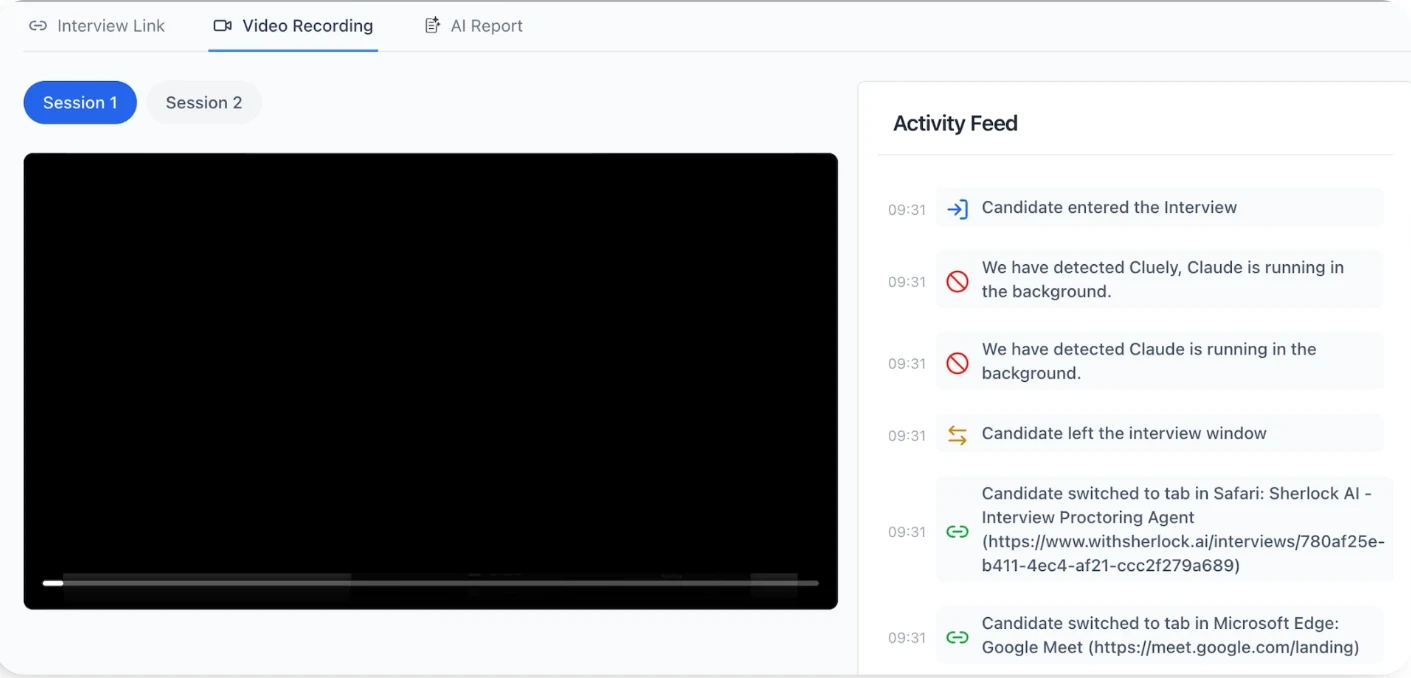
Screen activity can provide important context about what a candidate is doing during an online assessment or interview. Sherlock AI can analyze relevant screen and browser signals to identify activity that may indicate access to unauthorized resources.
Rather than treating every change in activity as suspicious, the system can consider the surrounding context and surface events that may warrant further review. This helps reviewers focus on potentially meaningful activity instead of manually watching every second of a recorded session.
AI-Assisted Behavior
The availability of generative AI has introduced new challenges for remote assessments and interviews. Candidates may use AI assistants or external tools to generate answers, solve technical problems, or provide assistance during an evaluation.
Sherlock AI is designed to help identify signals associated with potential AI-assisted behavior. By analyzing activity across the session, it can surface patterns that may indicate the candidate is receiving external assistance rather than completing the assessment independently.
Device and Environment Signals
A candidate's physical environment can provide additional signals about the integrity of a remote assessment. Additional devices, unexpected people, or unusual activity around the candidate may indicate potential sources of unauthorized assistance.
Sherlock AI can analyze available environment and device signals alongside other session data. Considering these signals together provides more context than relying on a single webcam event or isolated detection.
Behavioral Patterns
Suspicious behavior is not always represented by a single obvious violation. A candidate may display several subtle signals throughout an interview or assessment that become more meaningful when considered together.
Sherlock AI analyzes patterns across available signals to help identify behavior that may require further investigation. This approach allows the system to move beyond simple rule-based detection and consider the broader context of a candidate's activity.
Risk-Based Insights
Not every detected event represents misconduct. Excessive alerts can create unnecessary work for reviewers and make it harder to identify genuinely important events.
Sherlock AI can help prioritize relevant signals and provide risk-based insights, allowing organizations to focus their attention on sessions or moments that require closer examination. This creates a more practical workflow for reviewing large numbers of remote interviews and assessments.
Human Review and Context
AI-powered proctoring should support human decision-making rather than automatically treating every detected event as proof of cheating. Context matters, particularly when unusual behavior can have legitimate explanations.
Sherlock AI helps surface relevant evidence and patterns so organizations can investigate potential issues and make informed decisions. This combination of AI-assisted detection and human judgment can provide a more balanced approach to maintaining integrity in remote assessments and interviews.
By combining multiple signals, behavioral analysis, and AI-assisted detection, Sherlock AI extends traditional online proctoring from basic monitoring toward a more context-aware approach to assessment integrity.
Conclusion
Online proctoring has evolved from basic webcam supervision into a broader approach to maintaining integrity across online exams, assessments, and remote interviews. Modern proctoring combines identity verification, screen and browser monitoring, environmental signals, behavioral analysis, and AI-powered detection to provide a clearer view of what happens during a remote session.
As candidates gain access to increasingly sophisticated AI tools and other forms of external assistance, simply recording or observing an assessment may no longer be enough. Organizations need solutions that can analyze multiple signals, identify meaningful patterns, and provide relevant evidence for review.
This is where AI-powered proctoring can play an important role. Sherlock AI acts as an AI proctoring agent that helps organizations detect potential unauthorized assistance and suspicious behavior during remote interviews and assessments, while keeping human judgment part of the review process.
For organizations building a reliable remote hiring or assessment process, the goal is not to monitor candidates more aggressively. It is to use the right technology to make remote evaluations more trustworthy, consistent, and easier to review.
Make Remote Interviews More Trustworthy AI-assisted cheating is changing how companies evaluate candidates. Sherlock AI helps hiring teams identify potential unauthorized assistance and suspicious behavior during remote interviews, so they can make more informed hiring decisions Book a Demo |
|---|
FAQs
1. What is online proctoring?
Online proctoring is the use of software, AI, and sometimes human oversight to monitor candidates or test-takers during online exams, assessments, and interviews. Depending on the system, it can verify identity, monitor webcam and audio activity, analyze screen and browser behavior, check the testing environment, and flag activity that may require further review.
2. How does online proctoring work?
Online proctoring typically involves several stages, including identity verification, environment checks, system and browser setup, continuous monitoring, behavior analysis, and post-assessment review. The system can collect signals from video, audio, screen activity, browser behavior, and other available sources to identify events or patterns that may require further investigation.
3. What does online proctoring monitor?
Depending on the platform, online proctoring can monitor candidate identity and presence, webcam video, the surrounding environment, audio, screen activity, browser behavior, device signals, and behavioral patterns. These signals are generally considered together rather than treated as conclusive evidence of misconduct on their own.
4. What are the different types of online proctoring?
The four common types of online proctoring are live, automated, recorded, and hybrid proctoring. Live proctoring uses a human proctor, automated proctoring uses software and AI, recorded proctoring captures sessions for later review, and hybrid proctoring combines automated monitoring with human oversight. The right approach depends on factors such as assessment risk, candidate volume, cost, and required oversight.
5. What features should online proctoring software have?
Key online proctoring features can include identity verification, environment and device checks, webcam and audio monitoring, screen recording, browser monitoring, access controls, behavioral analysis, AI-based detection, and session reporting. The effectiveness of a proctoring system depends not only on the number of features, but also on how accurately it captures signals and how effectively it separates meaningful events from noise.
6. Can online proctoring detect AI-assisted cheating?
Some online proctoring systems can identify signals associated with potential AI-assisted cheating, such as unusual screen activity, external tools, or behavioral patterns during an assessment. However, a single signal does not necessarily prove misconduct. More advanced systems analyze multiple signals together and can surface patterns that may require further human review.
7. What is interview proctoring?
Interview proctoring refers to using technology to monitor and protect the integrity of remote interviews. It can involve identity verification, screen and browser monitoring, audio and video analysis, environment checks, and behavioral signals. In remote hiring, interview proctoring can help organizations identify potential unauthorized assistance and other activity that may affect the reliability of candidate evaluations.
8. How does AI-powered proctoring improve remote interview integrity?
AI-powered proctoring can analyze multiple signals during a remote interview and identify patterns that may require further investigation. Instead of relying only on individual rule-based alerts, AI can help connect relevant signals and prioritize potentially important events. This can reduce manual review effort while giving hiring teams additional context when evaluating interview integrity.