Back to all blogs
Learn the 10 red flags that reveal interview impersonation, from identity mismatches to suspicious behavior, and protect your hiring process from fraud.

Abhishek Kaushik
Remote hiring has made recruitment faster and more accessible, but it has also increased the risk of interview impersonation. Today, companies are facing a growing number of cases where candidates use proxy interviewers, AI-generated responses, deepfake tools, or even completely different individuals to clear interviews fraudulently. As remote recruitment continues to expand, recruiters are finding it harder to verify whether the person attending the interview is actually the real candidate.
A Forbes report revealed that fraudulent hiring activities are becoming more sophisticated, especially in remote technical roles. The report highlighted that 72% of candidates admitted to lying on resumes, while 38% admitted to lying during interviews.
Interview impersonation is no longer limited to simple cheating methods. Fraudsters now use voice cloning software, hidden earpieces, AI-generated prompts, screen sharing tricks, and deepfake video manipulation to bypass traditional interview processes. Recruiters often notice suspicious signs such as delayed responses, mismatched communication styles, refusal to turn on cameras, robotic answers, or unusual body language during virtual interviews. For organizations, a fraudulent hire can create serious business risks, including data breaches, compliance issues, financial losses, and poor team performance.
10 Red Flags That Might Reveal Interview Impersonation
Below we will explore 10 major red flags that might reveal interview impersonation and how recruiters can identify these warning signs before making a costly hiring decision.
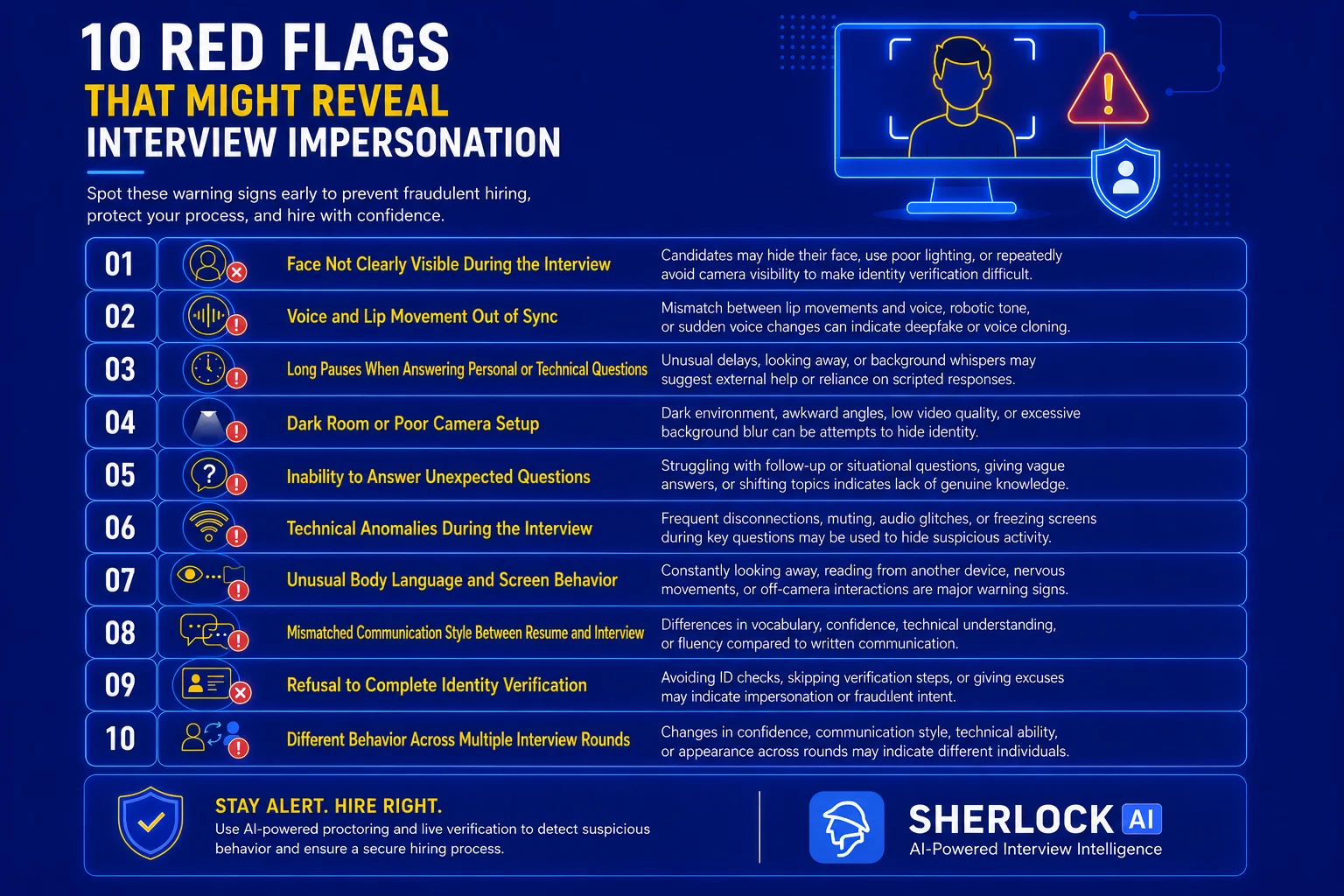
1. Face Not Clearly Visible During the Interview
One of the most common signs of interview impersonation is when the candidate’s face is not clearly visible throughout the interview. In remote hiring environments, fraudsters often try to avoid proper visibility to make identity verification difficult. Candidates may intentionally sit in dim lighting, position the camera far away, or keep moving out of the frame to prevent recruiters from closely observing facial expressions and behavior.
In some cases, candidates may claim repeated camera issues, poor internet connectivity, or hardware problems whenever interviewers request better visibility. Others may use blurred backgrounds, virtual overlays, or awkward camera angles to hide facial details. These tactics are often used to reduce the chances of detecting a proxy candidate or AI-generated video manipulation during the interview process.
Some common warning signs include:
Candidate keeps the camera off for long periods
Face appears partially hidden or heavily shadowed
Frequent excuses related to webcam issues
Camera angle constantly changes during the interview
Candidate avoids maintaining direct eye contact
Video quality suddenly drops during verification steps
Recruiters should treat repeated visibility issues as a potential risk, especially if the candidate behaves differently across multiple interview rounds. Simple verification measures such as asking the candidate to adjust lighting, maintain camera visibility, or perform live identity checks can help reduce impersonation attempts. AI-powered proctoring tools like Sherlock AI to detect suspicious visual behavior and strengthen remote interview security.
Tip: Ask candidates to join interviews from a well-lit environment with their camera positioned directly in front of them. Conduct a quick live identity verification before starting technical discussions.
2. Voice and Lip Movement Out of Sync
One of the strongest indicators of interview impersonation is when a candidate’s voice does not properly align with their lip movements during a virtual interview. As remote hiring grows, fraudsters are increasingly using deepfake technology, virtual camera tools, and voice cloning technology to manipulate interview processes. These tools can create noticeable delays between speech and facial movement, making the interaction appear unnatural.
Recruiters may observe that the candidate’s lips move before or after the audio is heard, or that facial expressions do not match the tone of the conversation. In some cases, the candidate’s voice may suddenly change in pitch, accent, or speaking style during different stages of the interview. These inconsistencies often become more visible during technical discussions or spontaneous follow-up questions where natural communication is important.
Some common warning signs include:
Delayed synchronization between speech and lip movement
Robotic or artificial sounding voice
Sudden changes in accent or tone
Frequent muting before answering questions
Audio glitches during technical discussions
Unnatural pauses before simple responses
Background whispers or overlapping voices
Recruiters should carefully monitor these inconsistencies throughout the interview process, especially during live problem-solving or behavioral rounds. Asking unexpected questions and encouraging detailed explanations can often expose candidates relying on external support or AI-assisted tools.
Tip: Pay close attention to audio and facial synchronization during conversations. Asking spontaneous follow-up questions can help identify unnatural response behavior or AI-assisted communication.
3. Long Pauses When Answering Personal or Technical Questions
Frequent long pauses during an interview can be another strong indicator of interview impersonation. While occasional pauses are normal during complex discussions, consistent delays before answering simple or experience-based questions may suggest that the candidate is receiving external assistance or relying on scripted responses. This behavior is especially noticeable during remote technical interviews where fraudsters often depend on hidden prompts, proxy support, or AI-generated answers.
Candidates involved in impersonation schemes may struggle when interviewers ask spontaneous follow-up questions related to their resume, previous projects, or work experience. Instead of responding naturally, they may pause for several seconds, look away from the screen repeatedly, or appear distracted while waiting for guidance from another person. In some cases, interviewers may even hear faint background whispers, typing sounds, or communication delays before the candidate answers.
Some common warning signs include:
Unusual delays before answering basic questions
Candidate frequently looking away from the screen
Repeated pauses during technical discussions
Delayed responses to resume-based questions
Background noises suggesting external assistance
Candidate asking interviewers to repeat simple questions frequently
Answers sounding overly rehearsed after long silence
Recruiters should carefully evaluate whether the candidate’s responses feel natural and experience-driven or delayed and scripted. Conducting live assessments, asking unexpected follow-up questions, and encouraging detailed explanations can help identify suspicious interview behavior before making a hiring decision.
Tip: Include real-time problem-solving tasks and ask candidates to explain their thought process step by step to reduce the chances of scripted or externally assisted answers.
4. Dark Room or Poor Camera Setup
A poorly lit room or suspicious camera setup can often indicate an attempt to hide identity during a remote interview. While technical issues can happen occasionally, candidates involved in interview impersonation may intentionally use dark environments, low-quality webcams, or distracting backgrounds to make facial verification difficult for recruiters.
In many cases, impersonators avoid proper lighting because clear visibility increases the chances of being identified. Some candidates may position the camera too close, too far away, or at unusual angles that partially hide their face. Others may frequently adjust their screen, move out of the frame, or keep only a portion of their face visible during important interview discussions.
Some common warning signs include:
Extremely dark or poorly lit interview environment
Face not fully visible on camera
Camera placed at awkward or constantly changing angles
Frequent movement outside the video frame
Low video quality during verification steps
Excessive use of virtual backgrounds or screen blur
Candidate refusing requests to improve visibility
Recruiters should encourage candidates to maintain a stable camera setup with proper lighting throughout the interview process. Simple verification checks such as requesting better visibility, asking candidates to reposition the camera, or conducting live identity confirmation can help reduce impersonation risks during remote hiring.
Tip: Set clear interview guidelines that require stable internet, proper lighting, and uninterrupted camera visibility throughout the interview process.
5. Inability to Answer Unexpected Questions
Candidates involved in interview impersonation often struggle when interviewers move away from scripted or predictable questions. While they may perform well with rehearsed answers, they usually find it difficult to respond naturally to spontaneous follow-up questions that require genuine experience, critical thinking, or role-specific knowledge.
This issue becomes more visible during technical interviews or behavioral discussions where interviewers ask candidates to explain previous projects, decision-making processes, or real-world challenges. Impersonators may provide vague answers, repeat generic statements, or take unusually long pauses before responding because they are relying on external help or memorized content.
Some common warning signs include:
Difficulty answering follow-up questions
Generic or overly broad responses
Repeatedly changing the topic during discussions
Struggling to explain projects mentioned on the resume
Inconsistent technical explanations
Long pauses before answering unexpected questions
Responses sounding memorized rather than experience-driven
Recruiters should include conversational and situational questions throughout the interview process to evaluate whether the candidate truly understands their work experience and technical skills. Real-time problem-solving and role-specific discussions can help reveal inconsistencies that scripted preparation often cannot hide.
Tip: Ask role-specific situational questions related to previous projects and encourage detailed explanations to evaluate genuine experience and technical understanding.
6. Technical Anomalies During the Interview
Frequent technical disruptions during an interview can sometimes indicate more than just connectivity issues. Candidates attempting interview impersonation may intentionally create technical distractions to hide suspicious activity, delay responses, or switch between external support systems during the interview process.
These anomalies may include sudden audio drops, repeated reconnections, frozen screens during difficult questions, or unusual microphone disturbances. In some cases, candidates may mute themselves frequently, disable video unexpectedly, or claim internet issues whenever interviewers ask verification-based or technical questions. Fraudsters may also use remote access tools, hidden communication devices, or AI-assisted software that can create irregular technical behavior during live interviews.
Some common warning signs include:
Repeated audio or video disconnections
Frequent muting before answering questions
Screen freezing during technical discussions
Sudden internet issues during verification steps
Delayed responses after reconnecting
Unusual echo, typing, or whispering sounds
Candidate switching devices multiple times during the interview
While genuine technical issues can happen, recruiters should observe whether disruptions occur repeatedly during critical parts of the interview. Consistent technical irregularities combined with suspicious behavior may indicate external assistance or impersonation attempts.
Tip: Use AI-powered interview proctoring platforms like Sherlock AI to monitor suspicious audio, video, and behavioral anomalies during remote interviews.
7. Unusual Body Language and Screen Behavior
Body language can reveal important clues during remote interviews, especially when candidates are attempting to hide external assistance or impersonation activities. Genuine candidates usually maintain natural eye contact, consistent engagement, and stable screen behavior throughout the conversation. Impersonators, however, often display unusual movements or distracted behavior while receiving help from another source.
Recruiters may notice candidates constantly looking away from the screen, reading from another monitor, or reacting unnaturally before answering questions. Some candidates repeatedly adjust their headset, glance toward another person off-camera, or appear nervous during simple discussions. These subtle behaviors can indicate that the candidate is relying on hidden prompts, proxy support, or external guidance during the interview.
Some common warning signs include:
Constantly looking away from the screen
Reading answers from another device or monitor
Nervous or unnatural facial expressions
Delayed reactions before responding
Frequent head movements toward off-camera areas
Repeated adjustment of headphones or microphone
Lack of natural engagement during conversation
Recruiters should pay attention to consistency in communication, eye movement, and overall interaction style throughout the interview process. Combining behavioral observation with live assessments and verification steps can help organizations identify suspicious interview activity more effectively.
Tip: Observe eye movement, screen distractions, and off-camera interactions carefully, especially during technical assessments and behavioral discussions.
8. Mismatched Communication Style Between Resume and Interview
A noticeable difference between a candidate’s written communication and spoken interaction can be a major red flag for interview impersonation. In many fraudulent hiring cases, the resume, email communication, and assessment submissions appear highly polished, but the candidate struggles to demonstrate the same level of expertise or communication skills during the live interview.
Recruiters may notice sudden differences in vocabulary, technical understanding, confidence level, or language fluency once the interview begins. For example, a candidate with an exceptionally detailed technical resume may provide vague verbal explanations or fail to discuss projects confidently. In some cases, the speaking style during one interview round may also differ significantly from another, suggesting that multiple individuals are participating in the hiring process.
Some common warning signs include:
Resume language far more advanced than spoken communication
Difficulty explaining projects mentioned in the resume
Sudden changes in communication style across interview rounds
Inconsistent technical terminology usage
Weak responses despite strong written assessments
Different accent, tone, or confidence level during interviews
Generic answers that lack real project experience
Recruiters should compare the candidate’s live communication abilities with their submitted resume, assessments, and previous interactions. Asking detailed project-based questions and requesting real-world examples can help identify whether the candidate genuinely possesses the skills and experience presented in their application.
Tip: Compare the candidate’s spoken communication with their resume, assessments, and email interactions to identify inconsistencies in expertise or language proficiency.
9. Refusal to Complete Identity Verification
Candidates who avoid or refuse identity verification steps during remote interviews can present a serious hiring risk. Most organizations today conduct basic verification checks such as requesting a government-issued ID, confirming candidate details on camera, or matching profile information before moving to advanced interview rounds. When a candidate repeatedly resists these standard procedures, it may indicate an attempt to hide impersonation or fraudulent activity.
Impersonators often avoid live verification because their appearance or identity may not match the original applicant’s information. Some candidates may become defensive when asked to verify their identity, while others create excuses related to privacy concerns, camera issues, or document availability. In more suspicious cases, candidates abruptly disconnect or delay the interview when verification requests are introduced.
Some common warning signs include:
Refusing to show a government-issued ID on camera
Avoiding live face verification requests
Providing excuses to skip verification steps
Disconnecting during identity confirmation
Delaying document submission repeatedly
Candidate details not matching official records
Visible hesitation during verification discussions
Recruiters should make identity verification a mandatory part of the remote hiring process, especially for technical and sensitive roles. Conducting verification checks before final interview rounds can help organizations reduce the risk of proxy interviews, fraudulent hiring, and compliance-related issues.
Tip: Make live identity verification a mandatory step before final interview rounds to reduce the risk of proxy interviews and fraudulent hiring.
10. Different Behavior Across Multiple Interview Rounds
One of the clearest signs of interview impersonation is when a candidate behaves noticeably differently across multiple interview rounds. In many fraudulent hiring cases, the person attending the initial screening is not the same individual participating in technical or final interviews. These inconsistencies often become visible through changes in communication style, confidence level, technical knowledge, appearance, or overall interaction behavior.
Recruiters may notice that the candidate speaks fluently in one round but struggles in another, or that their tone, accent, body language, and problem-solving abilities suddenly change. In some situations, candidates who performed exceptionally well during technical interviews fail to demonstrate the same expertise during onboarding or follow-up discussions. These behavioral inconsistencies can strongly indicate the involvement of proxy interviewers or external assistance.
Some common warning signs include:
Sudden changes in confidence or communication style
Different technical skill levels across rounds
Noticeable changes in voice, accent, or speaking pattern
Appearance inconsistencies between interviews
Strong performance in one round but weak follow-up responses
Different body language during separate interviews
Inconsistent project explanations or work experience details
Recruiters should compare interview recordings, technical responses, and communication patterns throughout the hiring process to identify unusual inconsistencies. Conducting structured verification checks and live assessments across multiple stages can help organizations detect impersonation attempts before extending an offer letter.
Tip: Maintain structured interview records and compare candidate behavior, technical responses, and communication style across every stage of the hiring process.
How Sherlock AI Helps Detect Interview Impersonation
Identifying interview impersonation manually can be difficult, especially when candidates use proxy interviewers, AI copilots, deepfake video, voice cloning, or other forms of external assistance. Recruiters may notice individual warning signs, but evaluating these signals consistently across multiple interviews can be challenging.
Sherlock AI is an interview integrity platform designed to help hiring teams detect candidate fraud, impersonation, deepfake interviews, and suspicious external assistance during remote interviews. Instead of relying on a single red flag, Sherlock AI combines identity, audio, video, behavioral, and interview-context signals to help recruiters investigate potential fraud.
Detects Proxy Candidates and Identity Mismatches
One of the primary risks in remote hiring is having someone other than the actual applicant participate in an interview. Sherlock AI can surface potential identity inconsistencies by analyzing changes in candidate presence, voice, behavior, and other signals throughout the interview.
This can help recruiters investigate situations where the person participating in the interview may not match the candidate who originally applied. Sherlock also supports identity verification workflows that can establish an identity baseline before the interview begins.
Identifies Deepfake Video and Voice Manipulation
Deepfake technology can make it increasingly difficult for recruiters to determine whether the person appearing on screen is genuine. Sherlock AI's deepfake detection capabilities analyze multiple audio and visual signals, including face continuity, voice characteristics, lip-sync timing, video artifacts, and changes in the interview feed.
Rather than treating a single anomaly as proof of fraud, Sherlock organizes suspicious signals into a reviewable trail with timestamps and contextual evidence. This allows hiring teams to investigate potential manipulation before making a hiring decision.
Flags AI-Assisted Responses and External Assistance
Interview impersonation is not limited to someone else taking the interview. Candidates may also receive real-time assistance from AI copilots, another person, or a second device while appearing to answer questions themselves.
Sherlock AI looks for signals associated with external assistance, including unusual response patterns, off-screen assistance, changes in reasoning or response behavior, and other inconsistencies that may indicate that the candidate is receiving help during the interview.
Provides Real-Time Interview Integrity Signals
Sherlock AI can monitor interviews continuously rather than relying only on a one-time identity check. Depending on the safeguarding mode selected, it can detect suspicious activity during the interview and provide signals that interviewers can investigate while the conversation is still fresh.
Its available workflows include Detect Only, Prevent + Detect, and Realtime Deepfake Detection + Detect, allowing organizations to choose the level of protection appropriate for their hiring process.
Generates Evidence-Based Integrity Reports
After an interview, Sherlock AI generates an integrity report containing information such as an integrity score, risk classification, and detected anomalies. These reports help recruiters review suspicious moments without relying entirely on memory or subjective impressions.
For example, a reviewer can investigate specific moments where the candidate's identity, voice, behavior, or response patterns changed rather than having to replay the entire interview looking for potential issues.
Keeps Human Review at the Center
AI-powered detection should support hiring decisions rather than automatically determine whether a candidate is fraudulent. Sherlock AI's approach is designed around evidence-led human review, giving recruiters contextual signals and reviewable evidence that can help them decide whether additional verification or investigation is necessary.
For organizations hiring remotely at scale, this can provide an additional layer of protection against proxy interviews, deepfakes, AI-assisted responses, and other forms of interview fraud without requiring recruiters to identify every suspicious behavior manually.
Conclusion
Interview impersonation is rapidly becoming one of the biggest challenges in remote hiring. As fraudsters continue using proxy candidates, deepfake technology, AI-generated responses, and external assistance tools, recruiters must become more proactive in identifying suspicious interview behavior. Ignoring these warning signs can lead to poor hiring decisions, security risks, financial losses, and long-term operational challenges for organizations.
From unclear camera visibility and delayed responses to mismatched communication styles and identity verification refusal, these red flags can help recruiters detect potential interview fraud before making a hiring decision. The key is to combine structured interview practices, live verification methods, and real-time behavioral monitoring throughout the recruitment process.
Modern hiring teams are increasingly adopting AI-powered interview proctoring solutions like Sherlock AI to improve candidate verification and strengthen interview security. By using the right technology and maintaining a consistent verification process, organizations can create a safer, more reliable, and fraud-resistant remote hiring experience.
Ready to transform your hiring process with smarter AI powered interview security and real time candidate verification? Explore how Sherlock AI helps teams detect interview impersonation while keeping hiring fast, fair, and human centered. |
Frequently Asked Questions
1. What is interview impersonation?
Interview impersonation occurs when someone other than the actual job candidate participates in an interview or when a candidate uses AI-generated or manipulated audio and video to misrepresent their identity.
2. How can recruiters detect interview impersonation?
Recruiters can look for warning signs such as poor camera visibility, voice and lip-sync inconsistencies, unusual pauses, unexpected technical disruptions, mismatched communication styles, refusal to complete identity verification, and different behavior across interview rounds.
3. What are the most common signs of interview impersonation?
Common signs include an unclear or poorly lit face, audio and video being out of sync, long pauses, inability to answer unexpected questions, unusual screen behavior, technical anomalies, identity verification refusal, and inconsistencies between interview rounds.
4. How does AI contribute to interview impersonation?
AI can be used to generate interview answers, clone voices, manipulate video, create deepfakes, and provide real-time assistance during interviews. These technologies can make it more difficult for recruiters to verify whether a candidate is genuinely participating in the interview.
5. Can Sherlock AI help detect interview impersonation?
Yes. Sherlock AI is presented in the article as an AI-powered interview security and proctoring solution that can help hiring teams identify suspicious audio, video, behavioral, and identity-related signals during remote interviews.